DeepAI Paper 代码 Agent 教程 CC Switch 导入 DeepAI Agent 配置教程:Codex、Claude Code 与模型端点

CC Switch 导入 DeepAI Agent 配置教程:Codex、Claude Code 与模型端点

这篇文章面向正在搜索“CC Switch 导入 DeepAI Agent”的开发者和 AI 工具用户。目标不是堆概念,而是把配置路径、Base URL、API Key、模型 ID、常见错误和 DeepAI API 中转站的落地方式讲清楚。

如果工具支持 OpenAI Compatible API,可以把 DeepAI 作为统一入口。推荐优先测试下面这个 Base URL:

https://api.deepai.wang/v1

CC Switch 适合解决什么问题

  • 在多个 Agent 配置之间快速切换。
  • 减少手动改 API Key 和 Base URL。
  • 为 Codex、Claude Code 等工具准备不同模型配置。

配置速查表

场景建议
第一次配置先用低成本模型测试
多模型切换按模型建立配置
排查 stream记录最终端点
升级工具先备份配置

常见坑位

  • 导入后不验证最终请求路径。
  • 多个配置共用同一 Key。
  • 升级前不备份。

FAQ

CC Switch 报错一定是 DeepAI 问题吗?

不一定,桥接工具自身版本、端点拼接和 stream 兼容都可能导致报错。

导入成功就一定能正常对话吗?

不一定,还要看模型、端点和客户端协议是否兼容。

建议每个客户端单独创建 DeepAI 令牌,不要所有工具共用一个 Key。这样遇到 401、404、429、流式中断或成本异常时,能更快从日志里定位问题。
相关阅读:API 中转站和官方 API 有什么区别?开发者该怎么选

Related Post

Cline deepai tool use xml context error.png

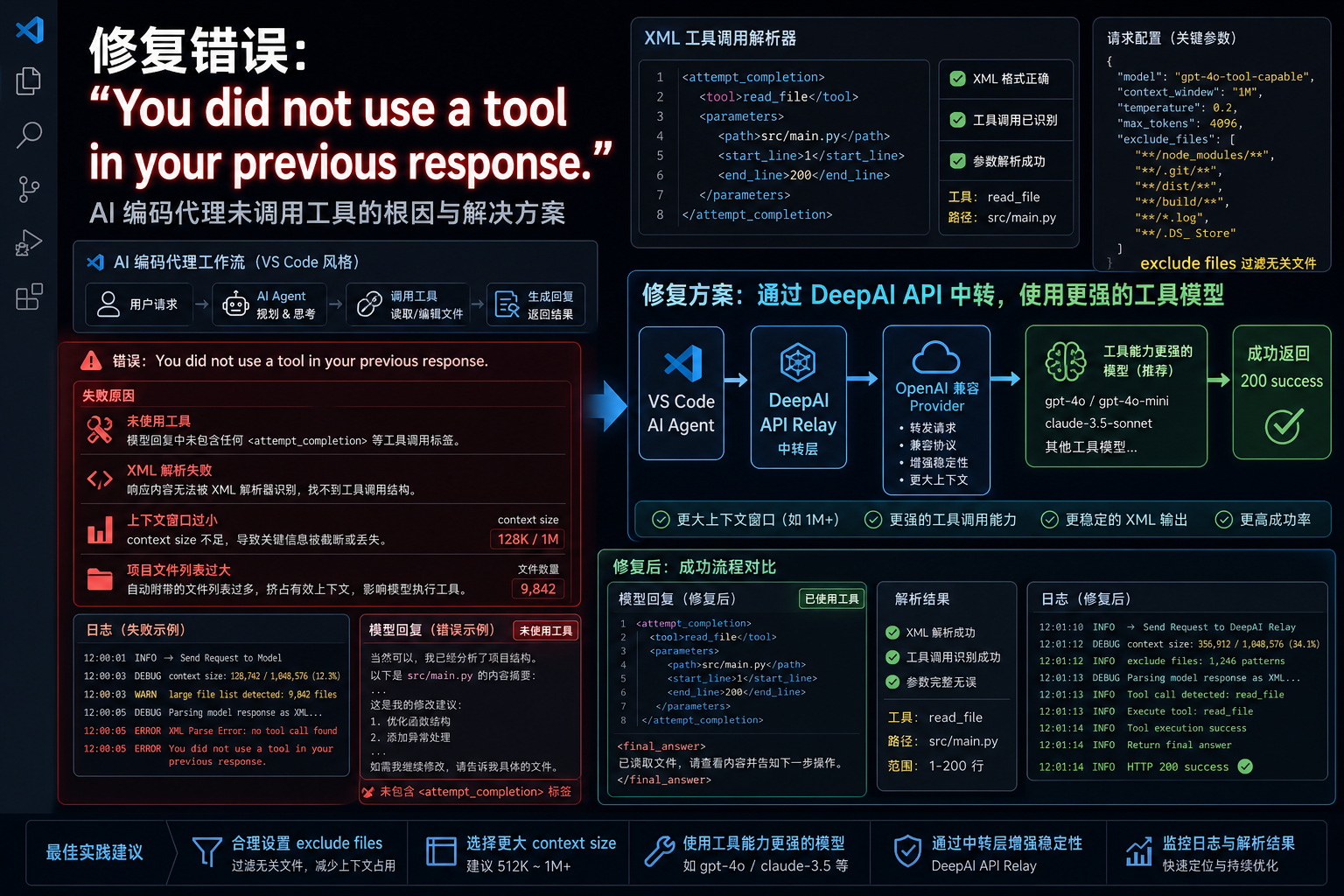
Cline 接入 DeepAI API 中转站:You did not use a tool 工具调用错误怎么排查Cline 接入 DeepAI API 中转站:You did not use a tool 工具调用错误怎么排查

Cline / Roo Code 类代码 Agent 通过 OpenAI-compatible Provider 接入中转站时,如果提示 You did not use a tool in your previous response,常见根因不是 Base URL,而是模型没有按 XML 工具格式输出、项目上下文过大或本地模型 context 太小。本文结合 Cline Issue #735,整理 DeepAI

N8n deepai tools agent bindtools tool calling.png

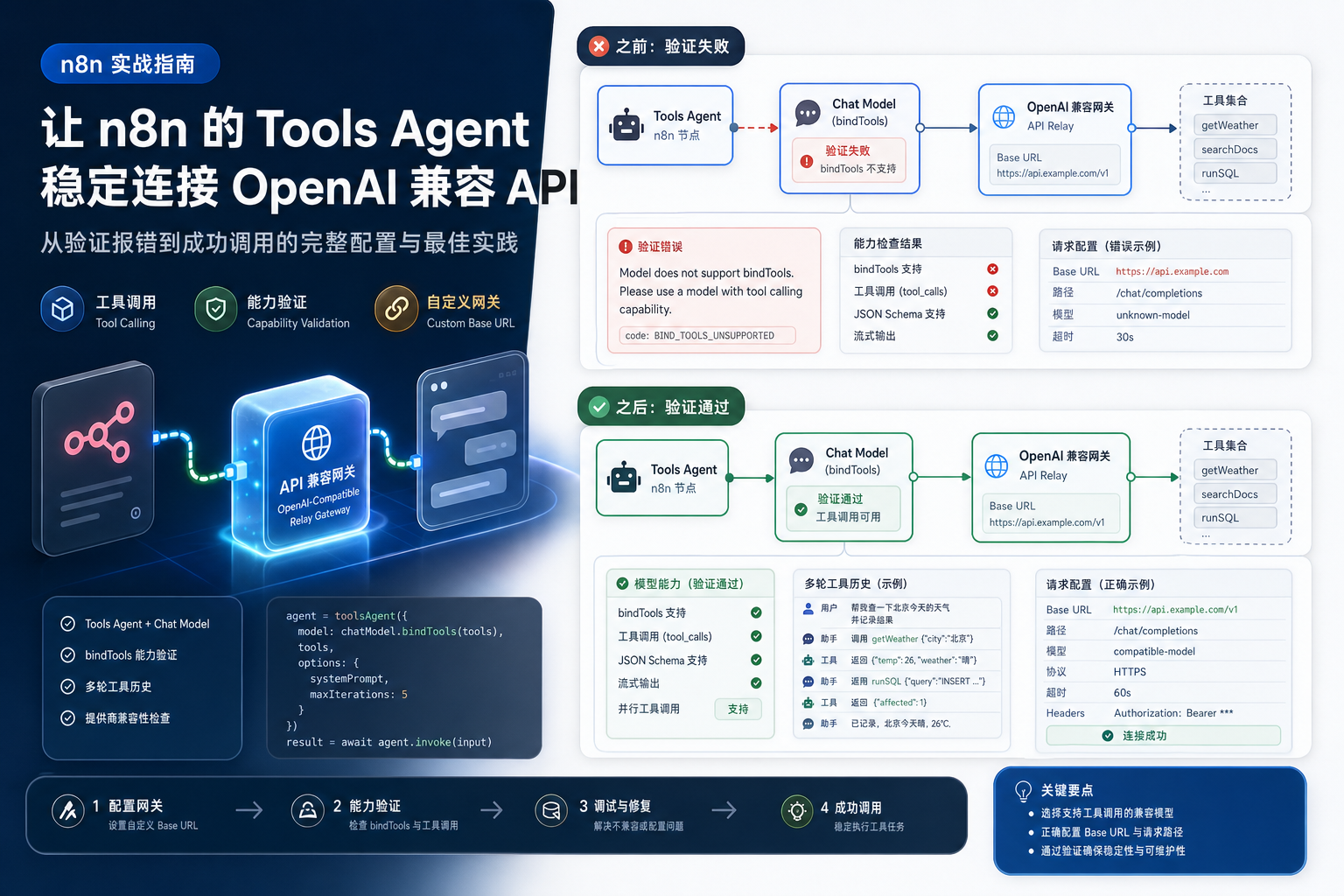
n8n 接入 DeepAI API 中转站:Tools Agent 提示模型不支持工具调用怎么排查n8n 接入 DeepAI API 中转站:Tools Agent 提示模型不支持工具调用怎么排查

n8n Tools Agent 使用 OpenAI-compatible Provider 时,模型明明支持 tool calling 却提示不支持 bindTools 怎么办?本文结合 n8n GitHub 已关闭 Issue,整理 DeepAI API 中转站、Chat Model、Base URL、多轮工具历史和 provider 兼容性排查方法。

Claude code deepai mcp empty params serialization.png

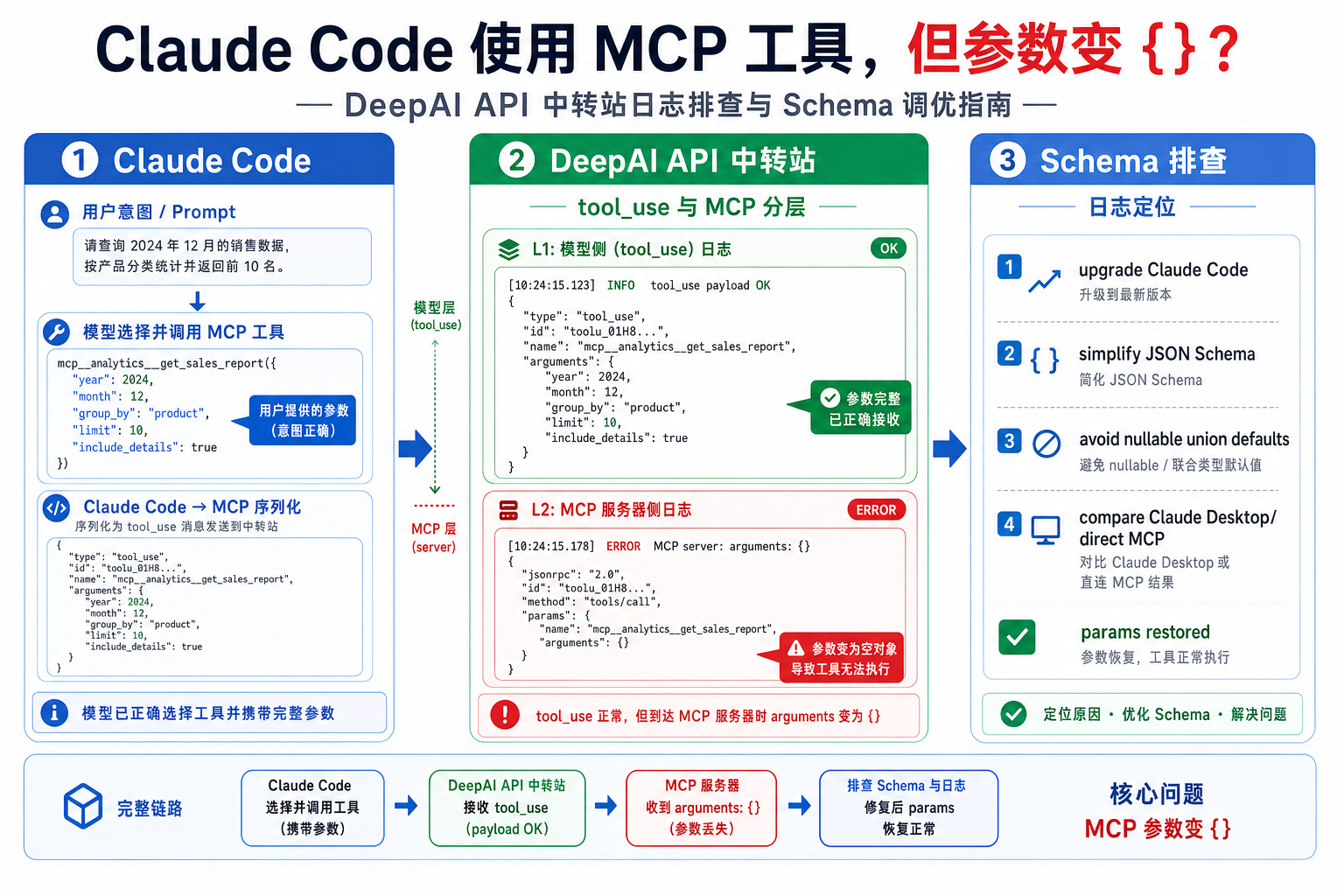
Claude Code 接入 DeepAI API 中转站:MCP 工具参数变成空对象 {} 的排查Claude Code 接入 DeepAI API 中转站:MCP 工具参数变成空对象 {} 的排查

Claude Code 使用 MCP 工具时,如果工具被调用但 MCP Server 收到的 arguments 变成 {},不要只排查 API 中转站。本文结合 anthropics/claude-code Issue #3966,讲清如何区分 DeepAI API 中转站请求、模型 tool use、Claude Code MCP 参数序列化和 MCP Server schema 四个层面。