分类: 客户端接入

Cherry Studio、Dify、Open WebUI、Cline、Chatbox、LobeChat 等客户端接入 DeepAI 教程。

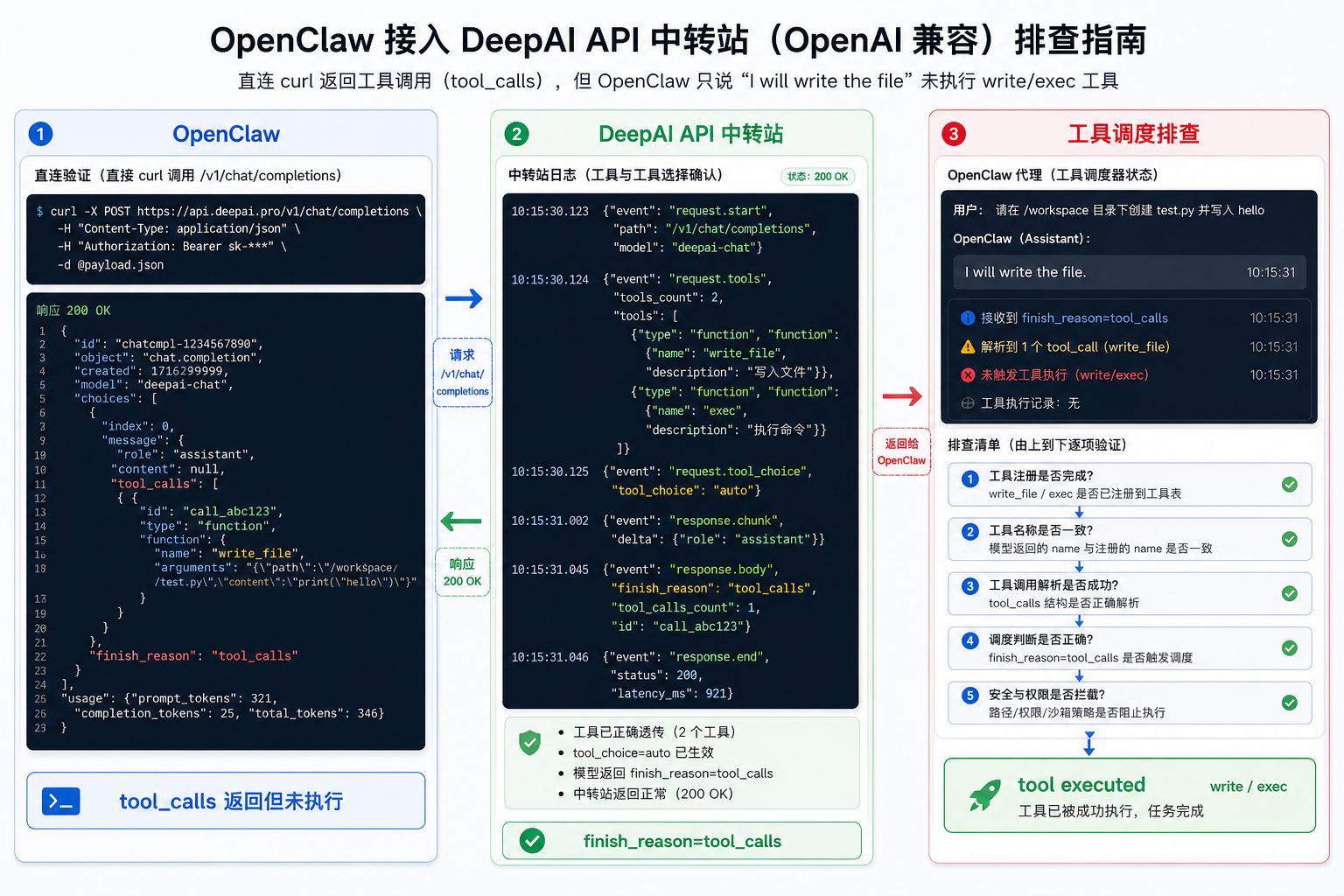
Openclaw deepai tool calls not executed.png

OpenClaw 接入 DeepAI API 中转站:返回 tool_calls 但工具不执行的排查OpenClaw 接入 DeepAI API 中转站:返回 tool_calls 但工具不执行的排查

OpenClaw 使用自定义 OpenAI-compatible Provider 时,直接 curl 能返回合法 tool_calls,但 Agent 只用自然语言回应,write、exec 等本地工具没有执行。本文结合 OpenClaw Issue #67745,整理 DeepAI API 中转站日志、tool_choice、finish_reason 与客户端工具调度的分层排查方法。
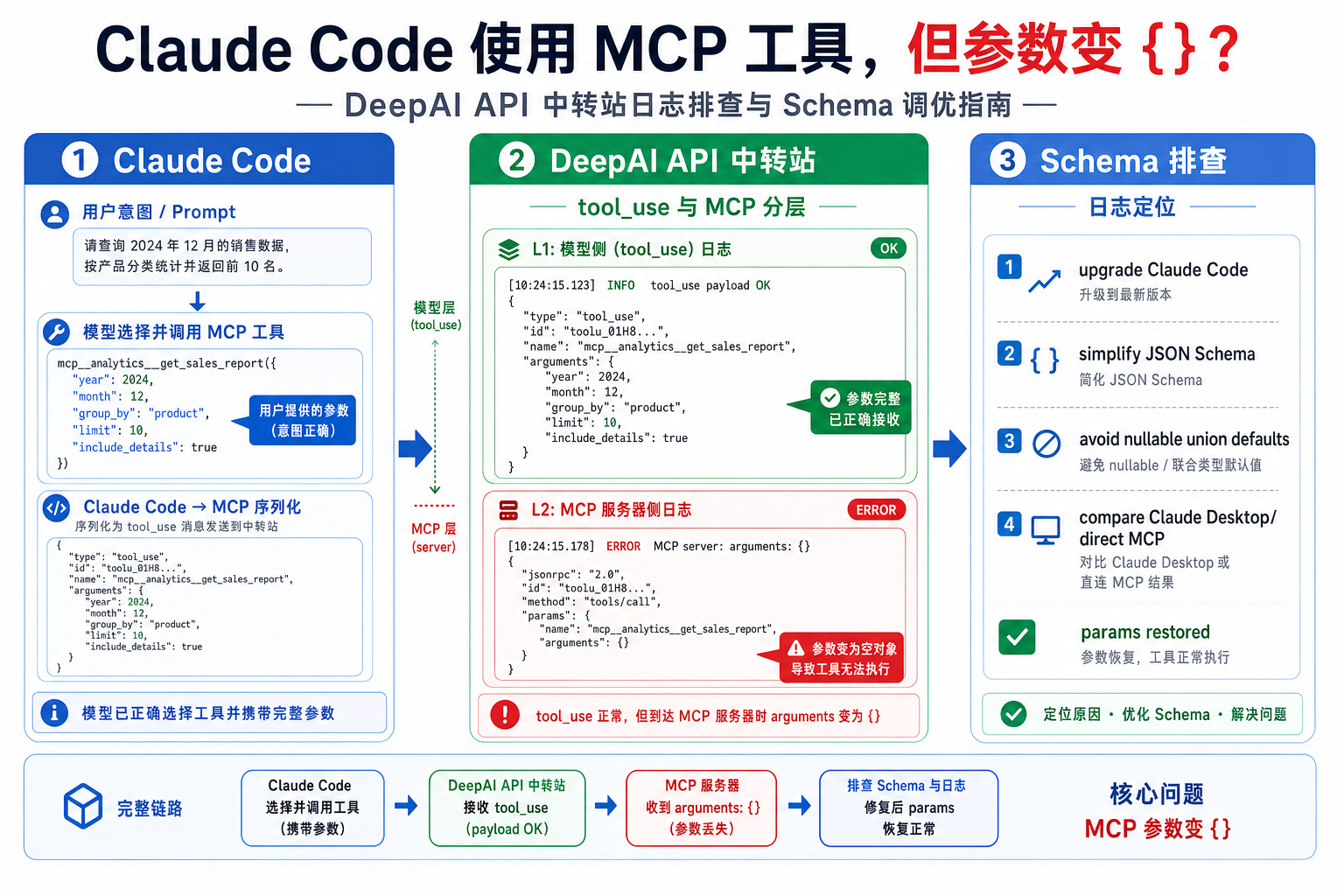
Claude code deepai mcp empty params serialization.png

Claude Code 接入 DeepAI API 中转站:MCP 工具参数变成空对象 {} 的排查Claude Code 接入 DeepAI API 中转站:MCP 工具参数变成空对象 {} 的排查

Claude Code 使用 MCP 工具时,如果工具被调用但 MCP Server 收到的 arguments 变成 {},不要只排查 API 中转站。本文结合 anthropics/claude-code Issue #3966,讲清如何区分 DeepAI API 中转站请求、模型 tool use、Claude Code MCP 参数序列化和 MCP Server schema 四个层面。

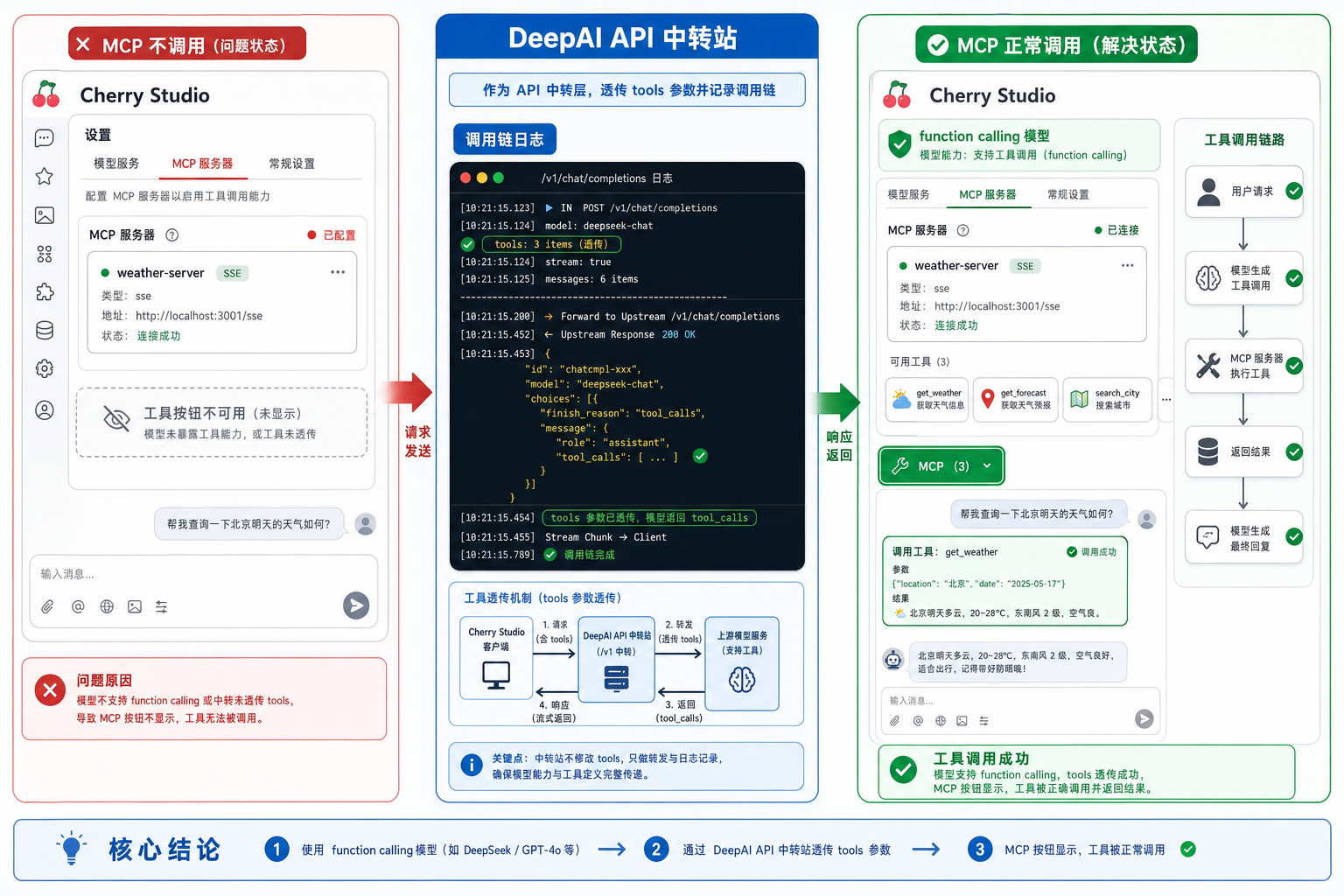
Cherry studio deepai mcp function calling model.png

Cherry Studio 接入 DeepAI API 中转站:MCP 不显示或不调用的 function calling 排查Cherry Studio 接入 DeepAI API 中转站:MCP 不显示或不调用的 function calling 排查

Cherry Studio 配好 MCP Server 后工具按钮不显示、MCP 没被调用,常见原因是输入框未启用 MCP,或模型没有被识别为 function calling 模型。本文结合 Cherry Studio Issue #3513 和 MCP 文档,整理 DeepAI API 中转站接入时的模型能力、tools 透传与日志排查方法。

Dify deepai openai compatible localhost connection refused.png

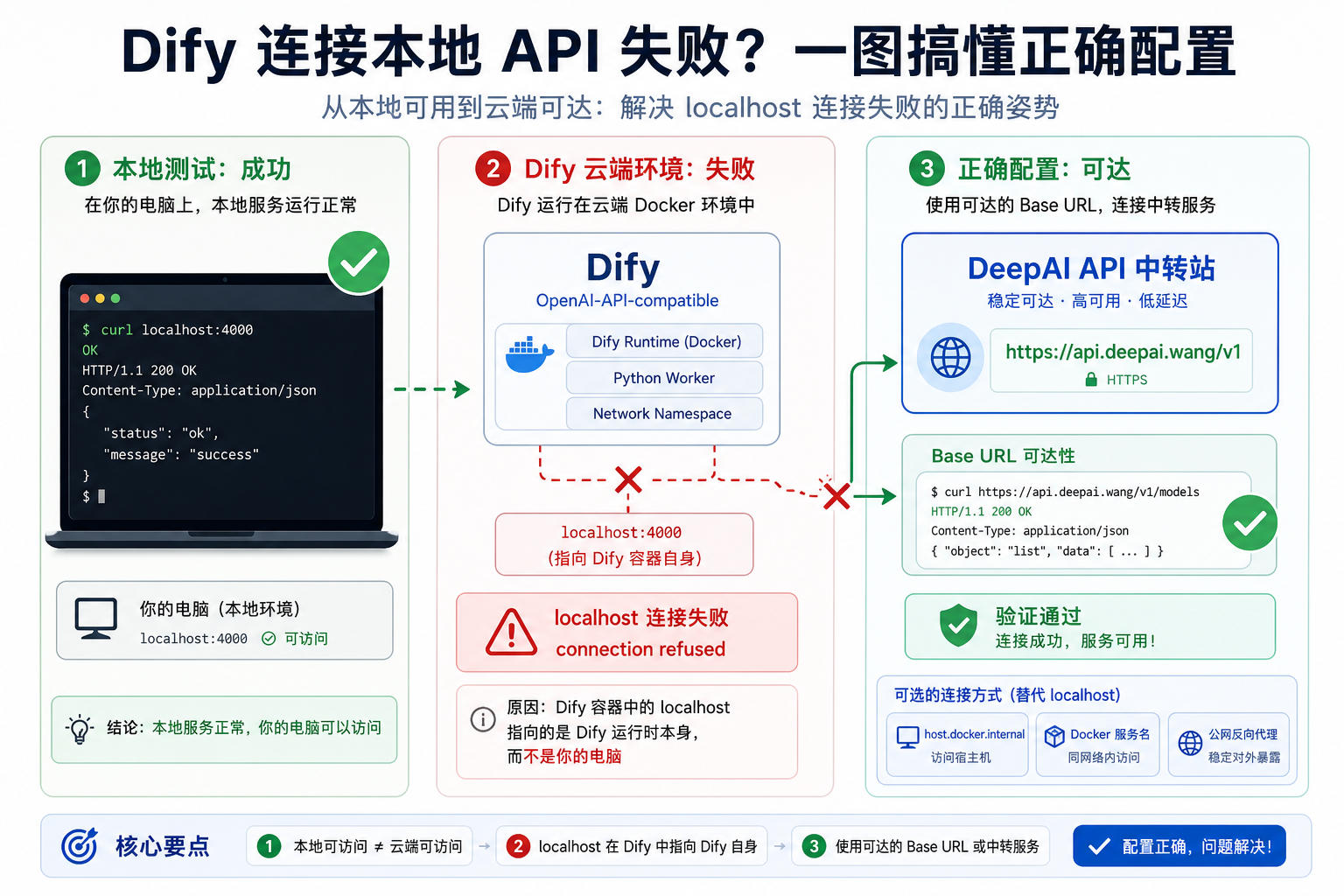
Dify 接入 DeepAI API 中转站:OpenAI-API-compatible 的 localhost 连接失败排查Dify 接入 DeepAI API 中转站:OpenAI-API-compatible 的 localhost 连接失败排查

Dify 通过 OpenAI-API-compatible 接入 LiteLLM、DeepAI API 中转站或本地代理时,curl 本机可用但 Dify 校验报 localhost connection refused,通常是网络可达性问题。本文结合 Dify Issue #4460 整理 Cloud、Docker、自托管场景下的 Base URL 排查方法。

N8n ai agent deepai custom base url mcp tools fail.png

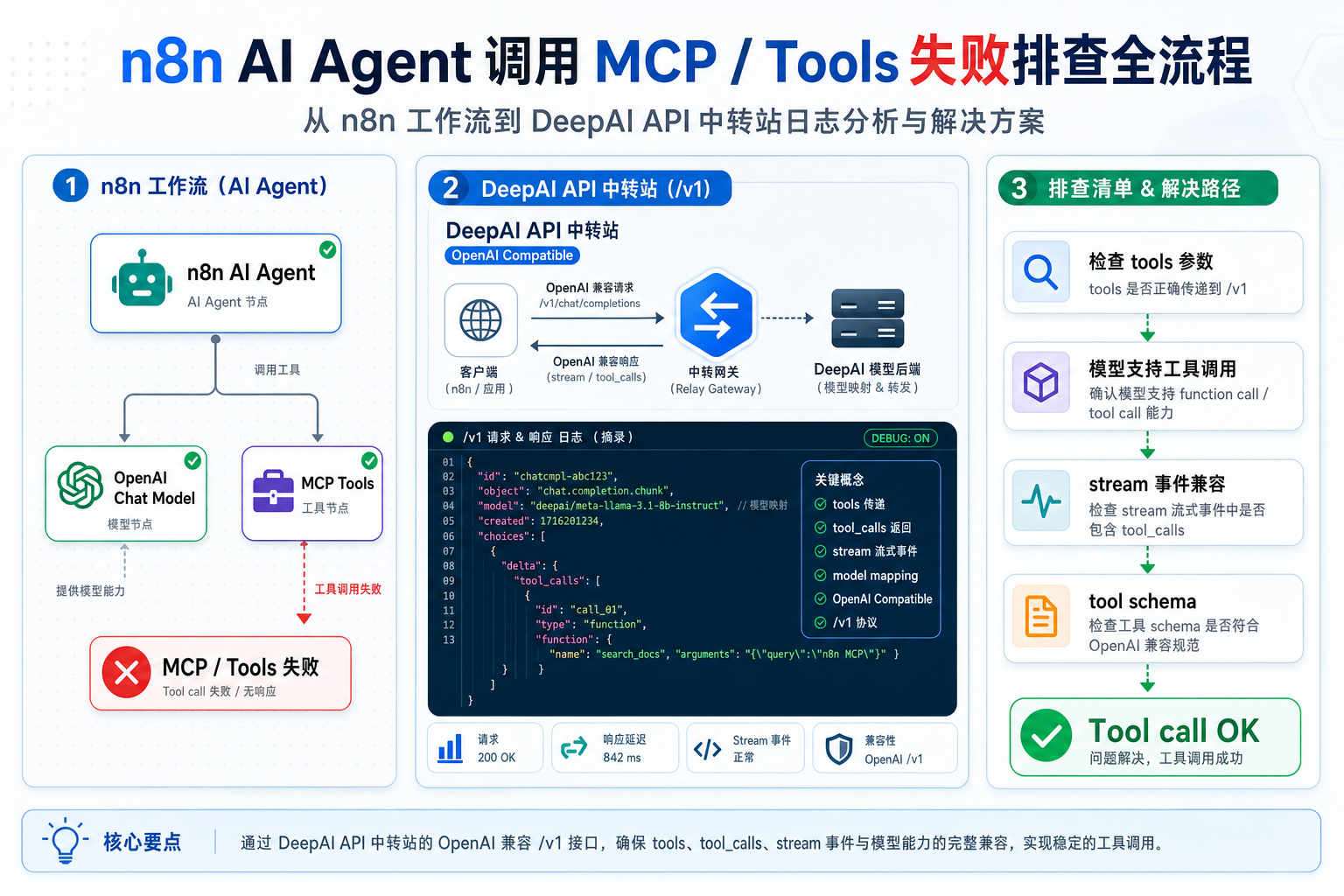
n8n AI Agent 接入 DeepAI API 中转站:自定义 Base URL 下 MCP/Tools 失败排查n8n AI Agent 接入 DeepAI API 中转站:自定义 Base URL 下 MCP/Tools 失败排查

n8n AI Agent 使用 OpenAI-compatible 自定义 Base URL 时,普通聊天能跑通,但连接 MCP Client 或 Tools 后失败,常见原因不是 Key 错,而是模型工具调用能力、tools 参数、streaming 与中转站透传不完整。本文结合 n8n Issue #15862 与官方文档整理排查路径。

Claude code deepai anthropic base url v1 messages.png

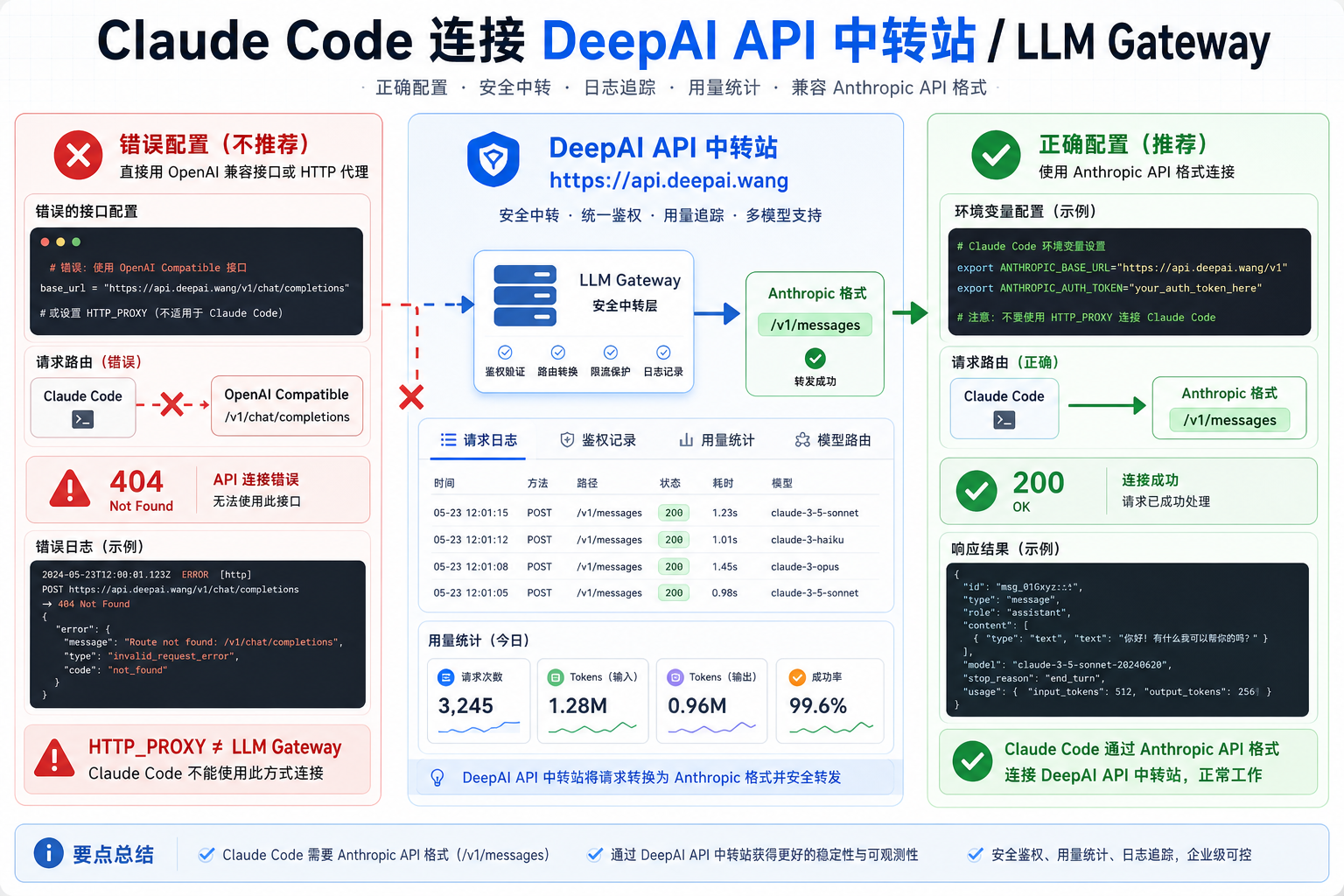
Claude Code 接入 DeepAI API 中转站:ANTHROPIC_BASE_URL 与 /v1/messages 怎么配置Claude Code 接入 DeepAI API 中转站:ANTHROPIC_BASE_URL 与 /v1/messages 怎么配置

Claude Code 支持通过 ANTHROPIC_BASE_URL 接入 LLM Gateway,但它需要 Anthropic API 格式的 /v1/messages,而不是普通 OpenAI-compatible /v1/chat/completions。本文结合 Claude Code Issue #216、官方 LLM Gateway 文档和 OAuth 覆盖问题,整理 DeepAI API 中转站场景下的接入与排查方法。

N8n deepai gpt5 unsupported stop parameter.png

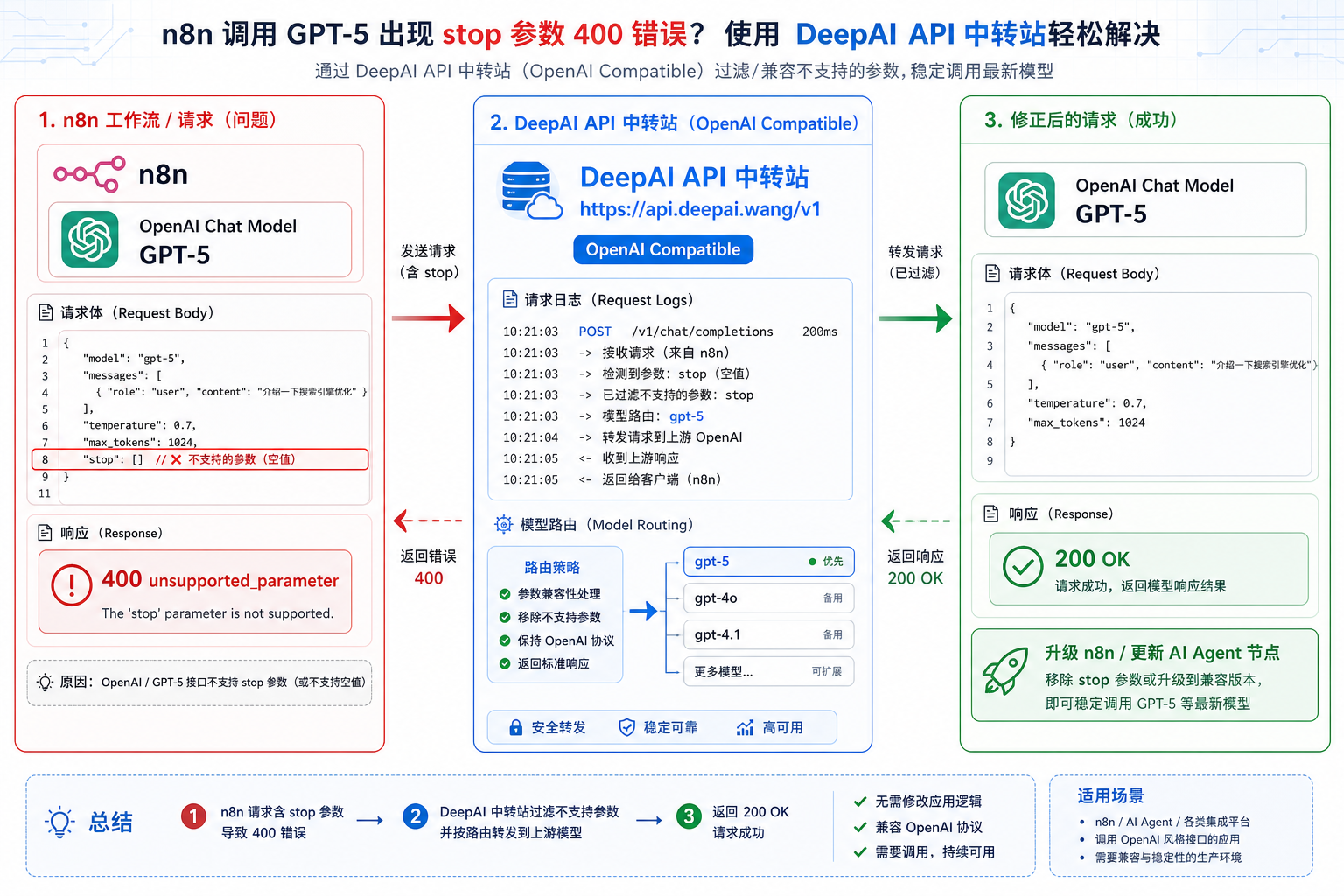
n8n 接入 DeepAI API 中转站:GPT-5 unsupported STOP parameter 怎么修n8n 接入 DeepAI API 中转站:GPT-5 unsupported STOP parameter 怎么修

n8n 的 OpenAI Chat Model 节点接入 GPT-5 或 OpenAI-compatible Provider 时,如果报 unsupported STOP parameter,即使界面里没有手动设置 stop,也要检查旧 LangChain 依赖、旧 AI Agent 模板和请求体透传。本文结合 n8n Issue #18149 和 PR #18213,整理 DeepAI API 中转站场景下的排查与修复方法。

Cherry studio deepai gpt5 reasoning effort 400.png

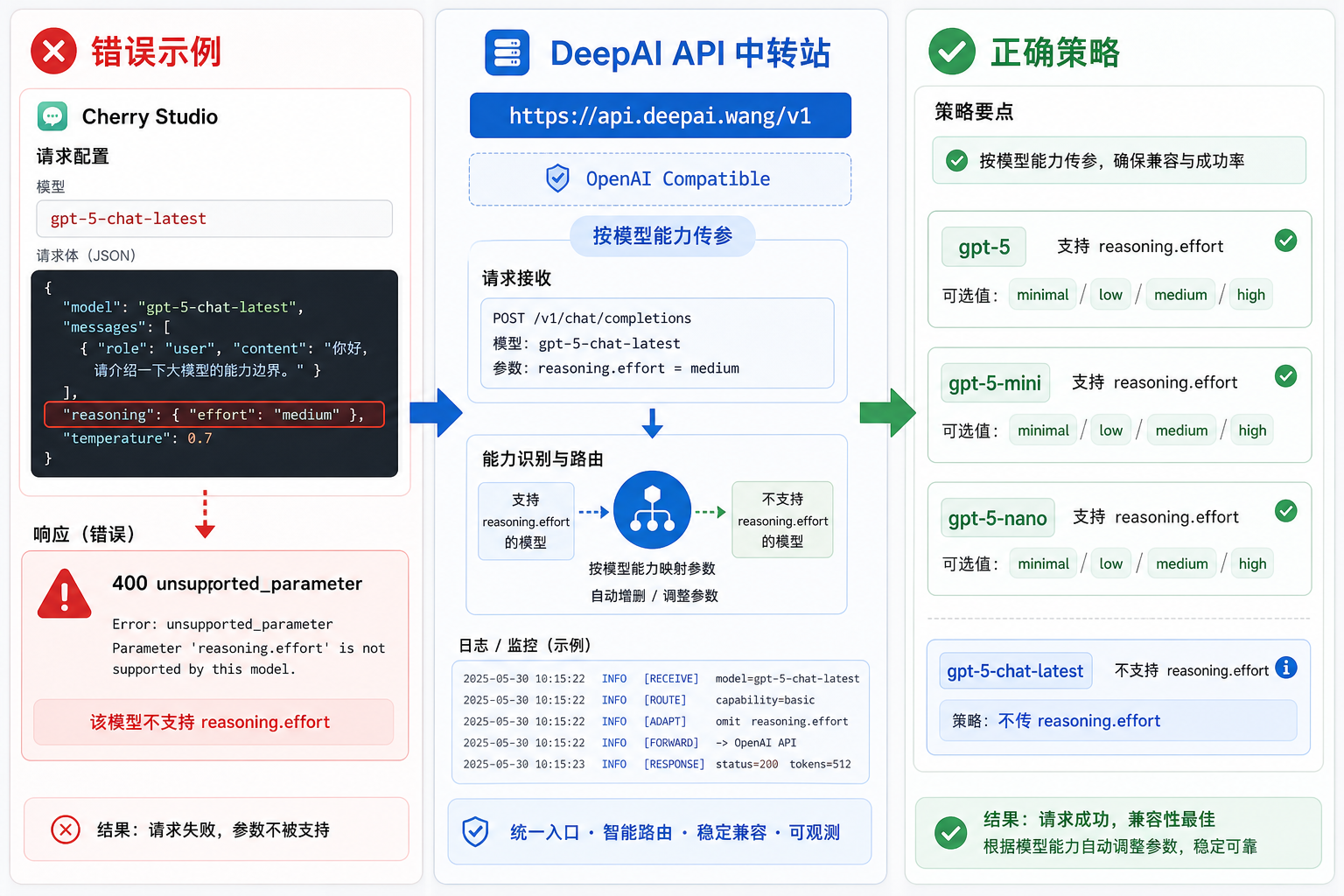
Cherry Studio 接入 DeepAI API 中转站:GPT-5 reasoning.effort 400 怎么排查Cherry Studio 接入 DeepAI API 中转站:GPT-5 reasoning.effort 400 怎么排查

Cherry Studio 通过 OpenAI-compatible Provider 接入 GPT-5 系列模型时,reasoning effort 需要按模型能力传参:gpt-5/gpt-5-mini/gpt-5-nano 支持 minimal/low/medium/high,但 gpt-5-chat-latest 可能不支持 reasoning.effort。本文结合 Cherry Studio Issue #9013 和 PR #8945,整理 DeepAI API 中转站场景下的排查与配置方法。

N8n deepai json mode internal error response format.png

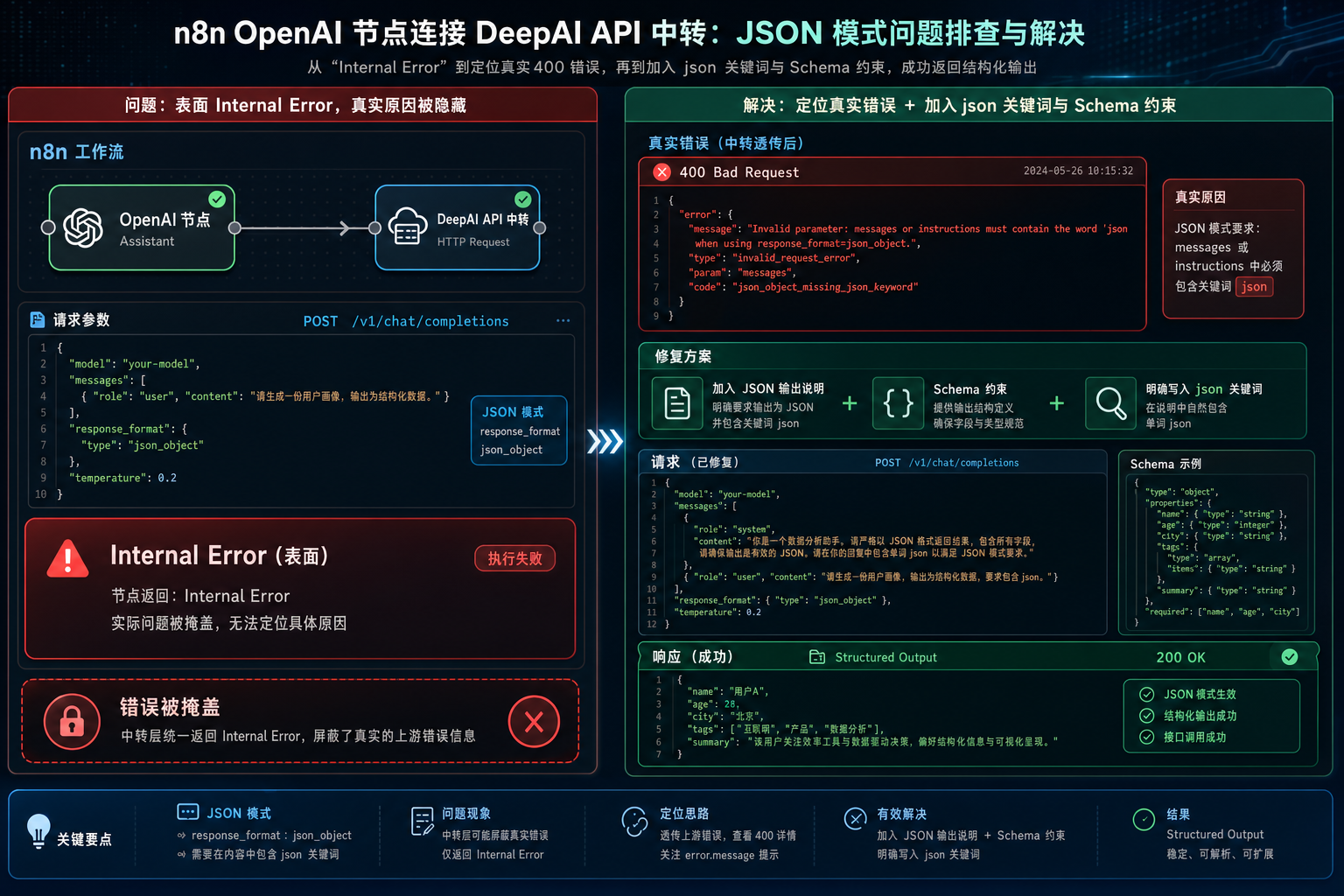
n8n 接入 DeepAI API 中转站:JSON mode 报 Internal Error 怎么定位真实 400n8n 接入 DeepAI API 中转站:JSON mode 报 Internal Error 怎么定位真实 400

n8n OpenAI 节点使用 JSON mode / response_format=json_object 时,如果只显示 Internal Error,真实上游错误可能是 messages 或 instructions 没有包含 json 关键字。本文结合 n8n Issue #10206 和 1.56.0 修复,整理 DeepAI API 中转站场景下如何定位真实 400、补充 JSON 输出说明和 Schema 约束。

N8n deepai embeddings openai zero vector encoding format.png

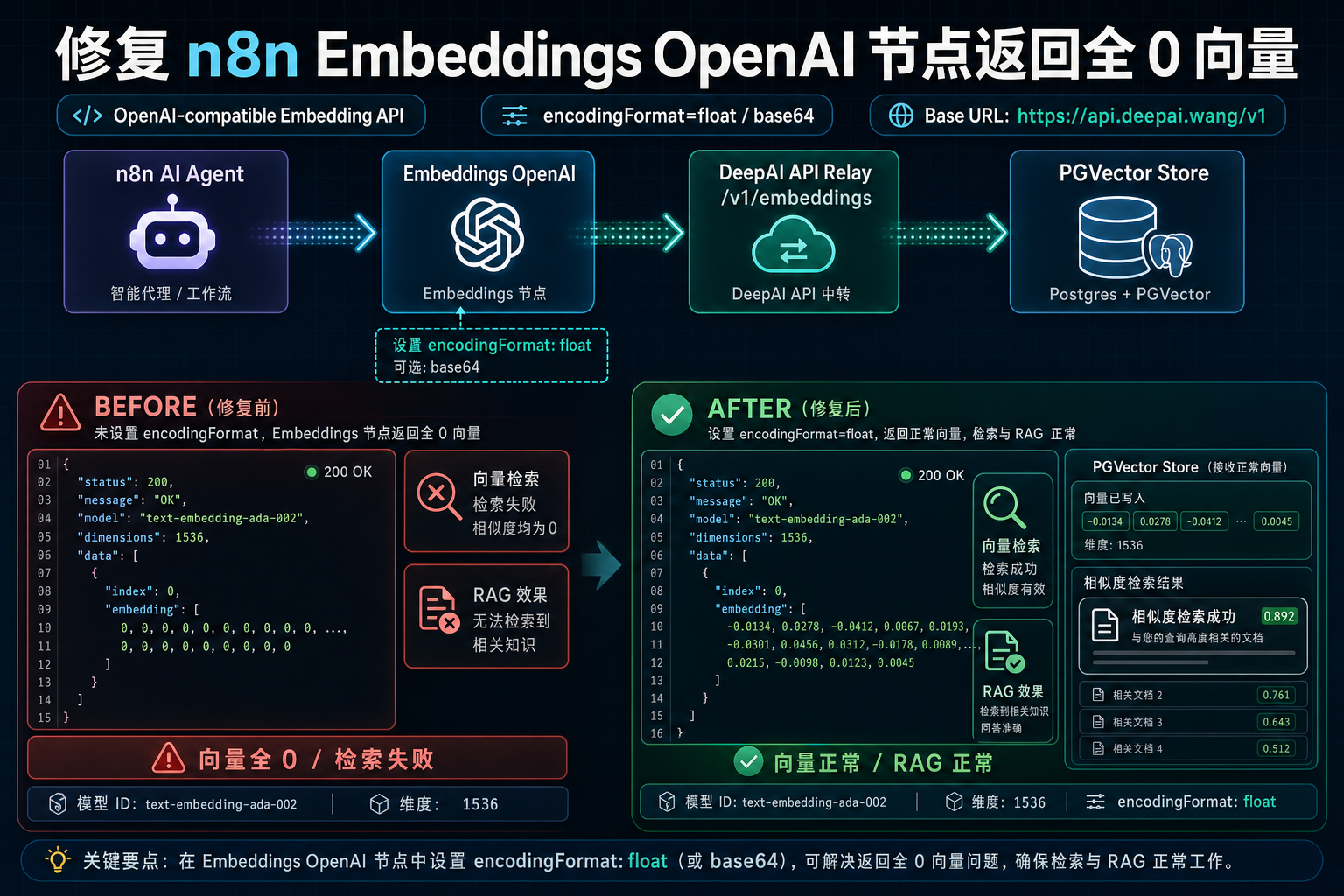
n8n 接入 DeepAI API 中转站:Embeddings OpenAI 返回全 0 向量怎么修n8n 接入 DeepAI API 中转站:Embeddings OpenAI 返回全 0 向量怎么修

n8n Embeddings OpenAI 节点通过 OpenAI-compatible Embedding API 接入向量工作流时,如果返回全 0 向量,RAG 和 PGVector 检索会全部失效。本文结合 n8n Issue #16985 和 PR #20877,说明如何用 encodingFormat 参数修复 LM Studio 等兼容接口问题,并整理 DeepAI API 中转站场景下的排查方法。

Cline deepai tool use xml context error.png

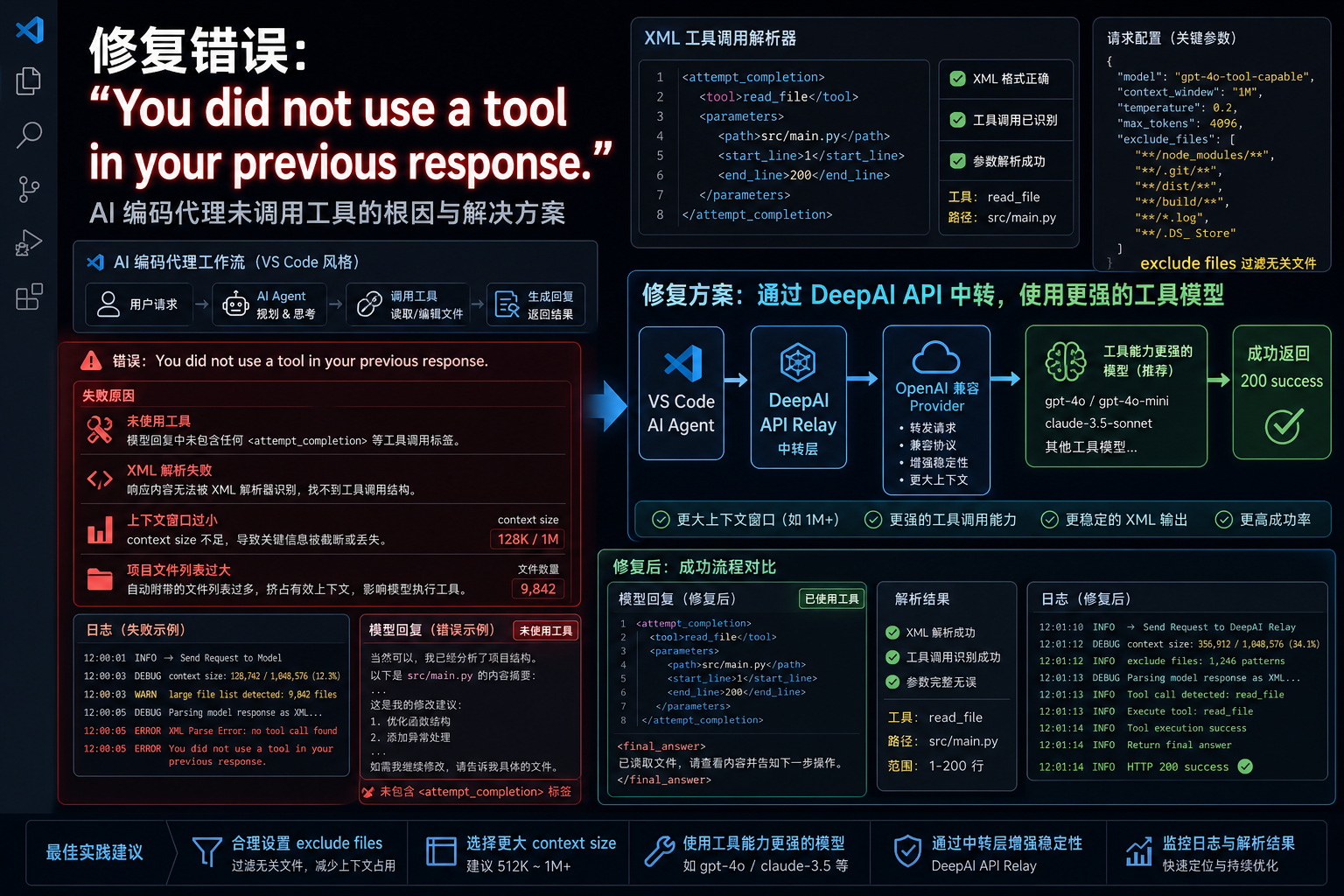
Cline 接入 DeepAI API 中转站:You did not use a tool 工具调用错误怎么排查Cline 接入 DeepAI API 中转站:You did not use a tool 工具调用错误怎么排查

Cline / Roo Code 类代码 Agent 通过 OpenAI-compatible Provider 接入中转站时,如果提示 You did not use a tool in your previous response,常见根因不是 Base URL,而是模型没有按 XML 工具格式输出、项目上下文过大或本地模型 context 太小。本文结合 Cline Issue #735,整理 DeepAI

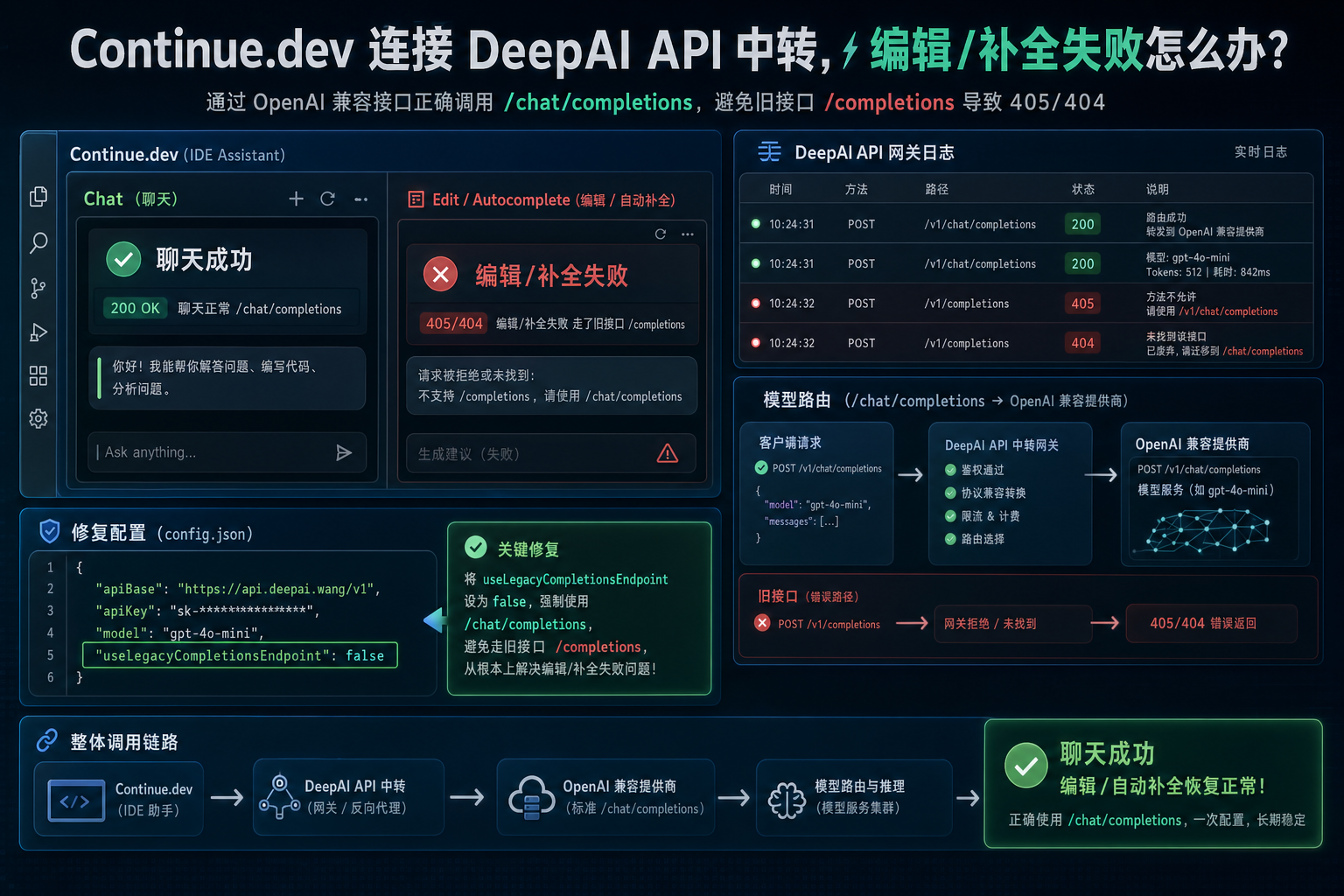
Continue dev deepai openai compatible legacy completions.png

Continue.dev 接入 DeepAI API 中转站:Edit 和 Autocomplete 误走 /completions 怎么修Continue.dev 接入 DeepAI API 中转站:Edit 和 Autocomplete 误走 /completions 怎么修

Continue.dev 通过 OpenAI Provider 接入 API 中转站时,Chat 能正常请求 /chat/completions,但 Edit 和 Autocomplete 却请求旧 /completions 导致 405/404。本文结合 Continue Issue #3620,说明如何用 useLegacyCompletionsEndpoint:false 强制走 /chat/completions,并整理 DeepAI API 中转站场景下的排查方法。