分类: 错误排查

401、403、404、429、5xx、流式中断、模型不存在等 API 常见错误解决方案。

Hermes agent deepai responses empty tool name 400.png

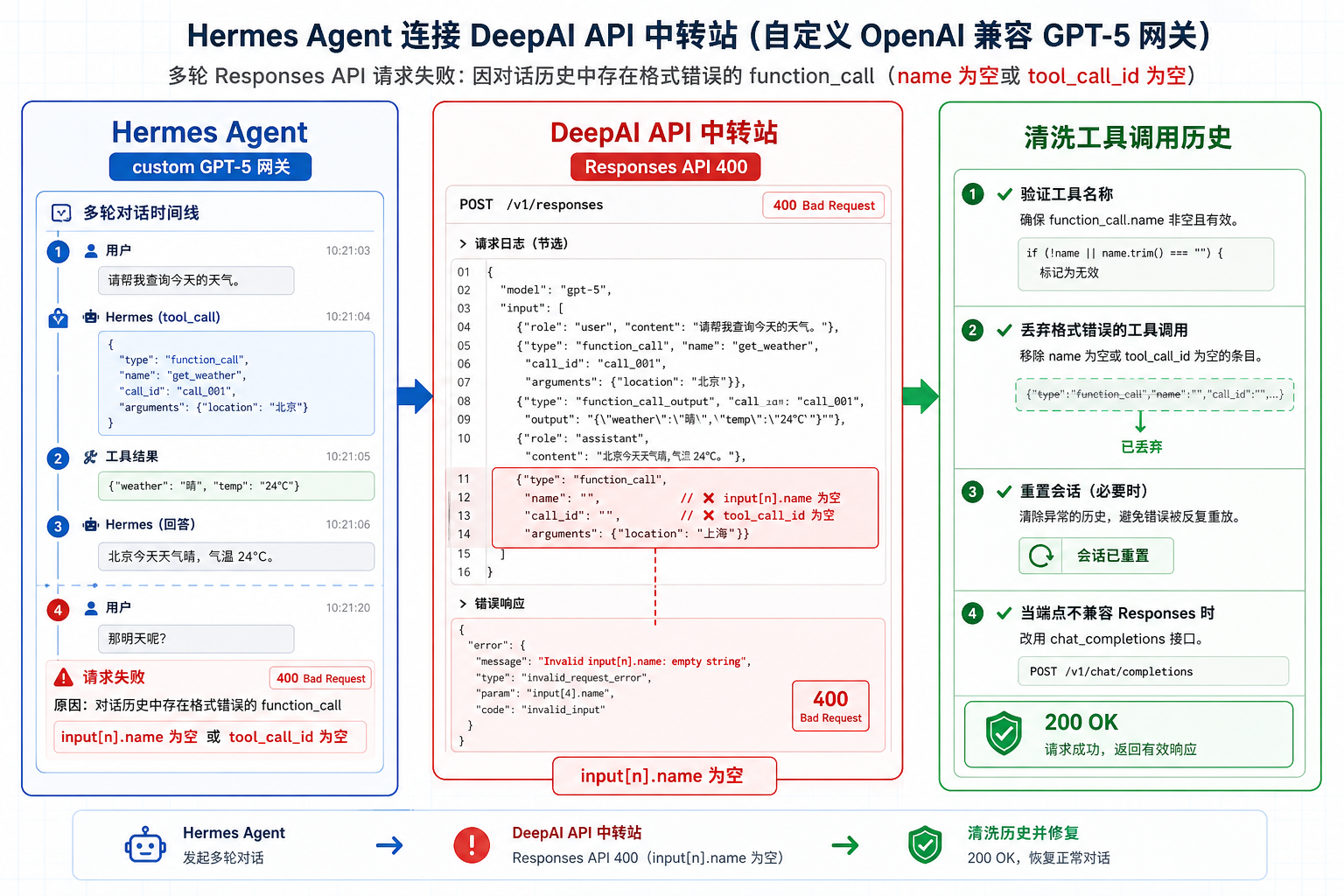
Hermes Agent 接入 DeepAI API 中转站:Responses API 空工具名 input[n].name 400 排查Hermes Agent 接入 DeepAI API 中转站:Responses API 空工具名 input[n].name 400 排查

Hermes Agent 使用 custom GPT-5 OpenAI-compatible 网关时,多轮会话可能因历史里出现空 function_call.name 或空 tool_call_id,触发 Responses API 400:Invalid input[n].name empty string。本文结合 Hermes Agent Issue #11411,整理 DeepAI API 中转站日志、工具调用历史清洗和协议选择排查方法。
Openclaw deepai tool calls not executed.png

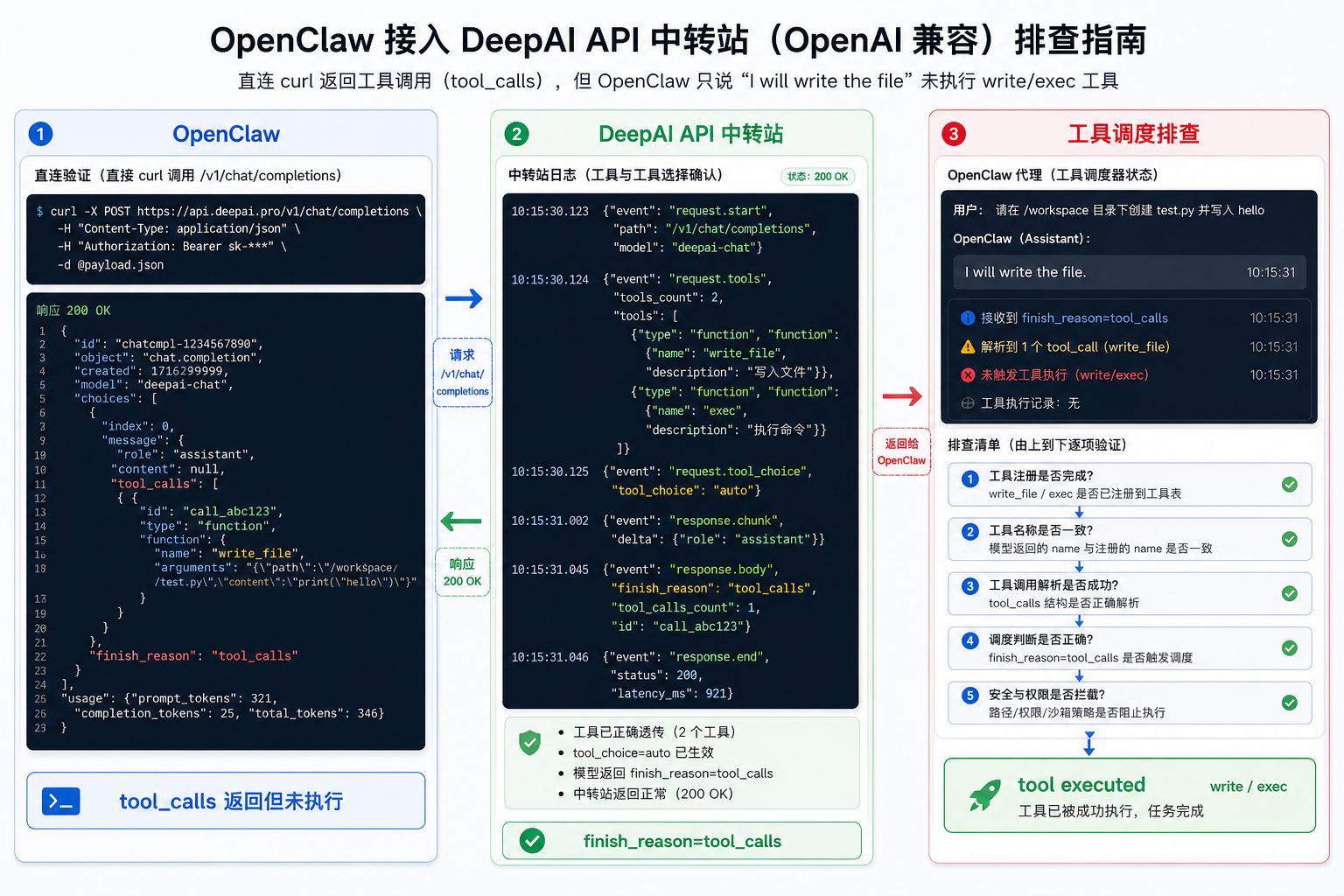
OpenClaw 接入 DeepAI API 中转站:返回 tool_calls 但工具不执行的排查OpenClaw 接入 DeepAI API 中转站:返回 tool_calls 但工具不执行的排查

OpenClaw 使用自定义 OpenAI-compatible Provider 时,直接 curl 能返回合法 tool_calls,但 Agent 只用自然语言回应,write、exec 等本地工具没有执行。本文结合 OpenClaw Issue #67745,整理 DeepAI API 中转站日志、tool_choice、finish_reason 与客户端工具调度的分层排查方法。

Claude code deepai mcp empty params serialization.png

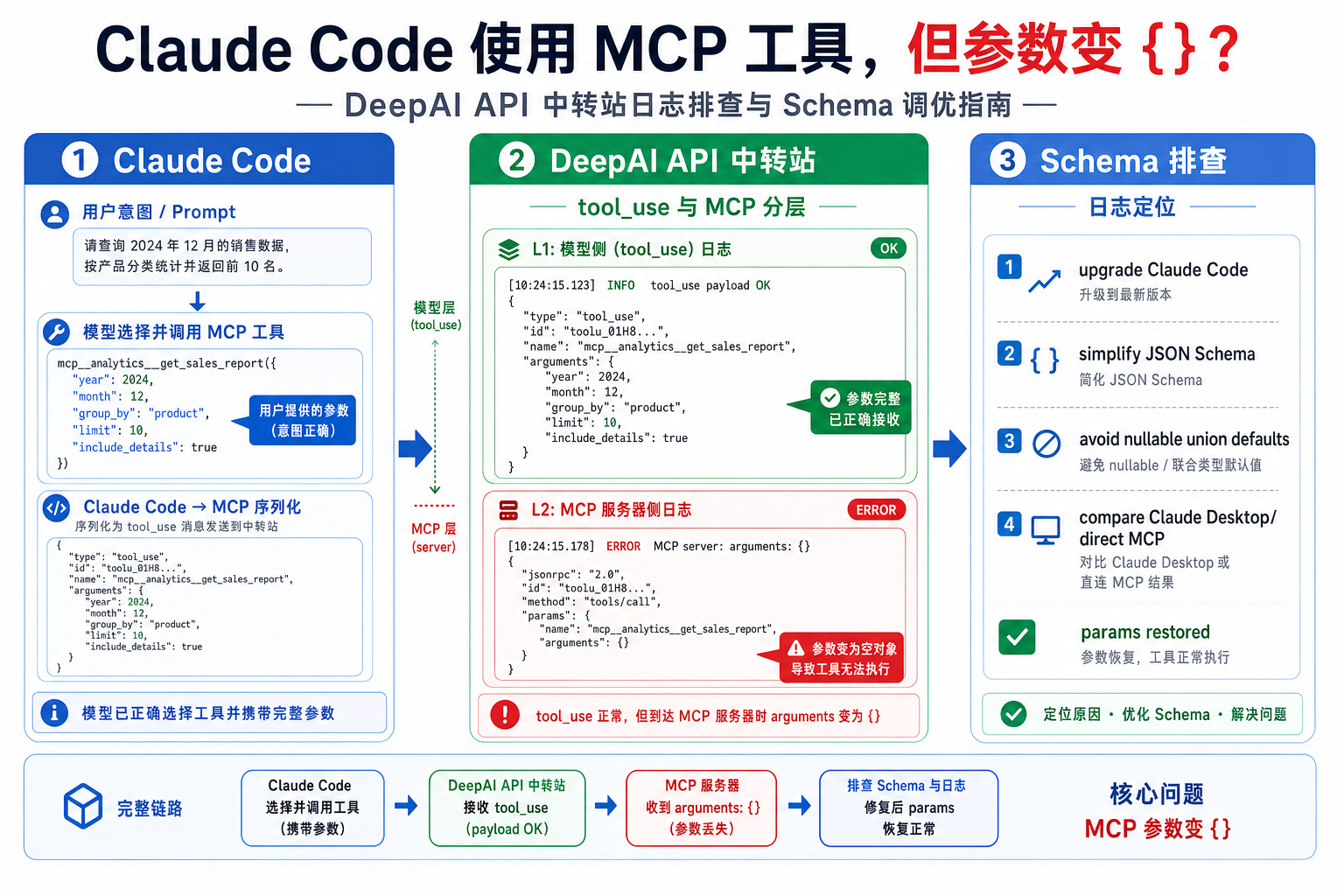
Claude Code 接入 DeepAI API 中转站:MCP 工具参数变成空对象 {} 的排查Claude Code 接入 DeepAI API 中转站:MCP 工具参数变成空对象 {} 的排查

Claude Code 使用 MCP 工具时,如果工具被调用但 MCP Server 收到的 arguments 变成 {},不要只排查 API 中转站。本文结合 anthropics/claude-code Issue #3966,讲清如何区分 DeepAI API 中转站请求、模型 tool use、Claude Code MCP 参数序列化和 MCP Server schema 四个层面。

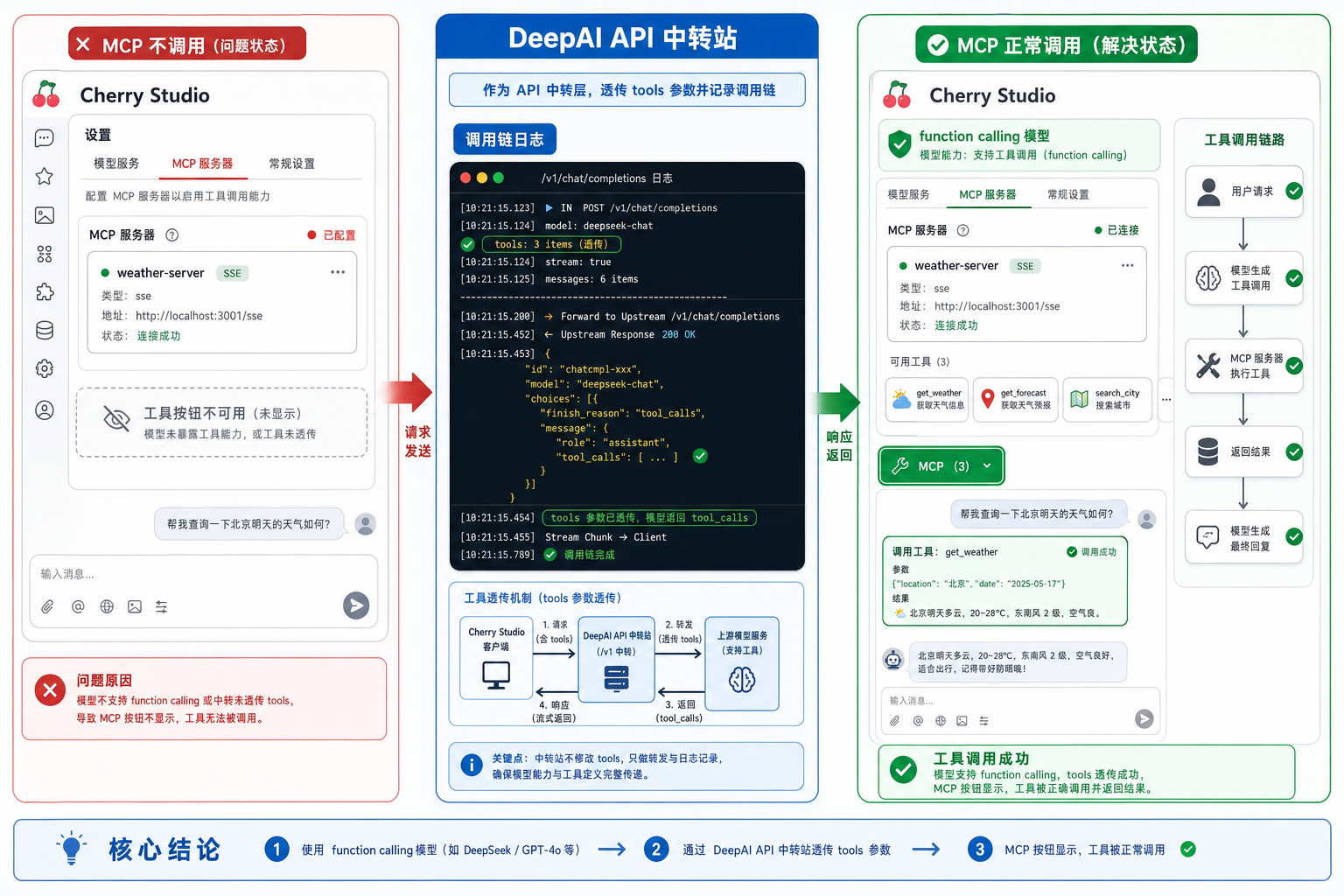
Cherry studio deepai mcp function calling model.png

Cherry Studio 接入 DeepAI API 中转站:MCP 不显示或不调用的 function calling 排查Cherry Studio 接入 DeepAI API 中转站:MCP 不显示或不调用的 function calling 排查

Cherry Studio 配好 MCP Server 后工具按钮不显示、MCP 没被调用,常见原因是输入框未启用 MCP,或模型没有被识别为 function calling 模型。本文结合 Cherry Studio Issue #3513 和 MCP 文档,整理 DeepAI API 中转站接入时的模型能力、tools 透传与日志排查方法。

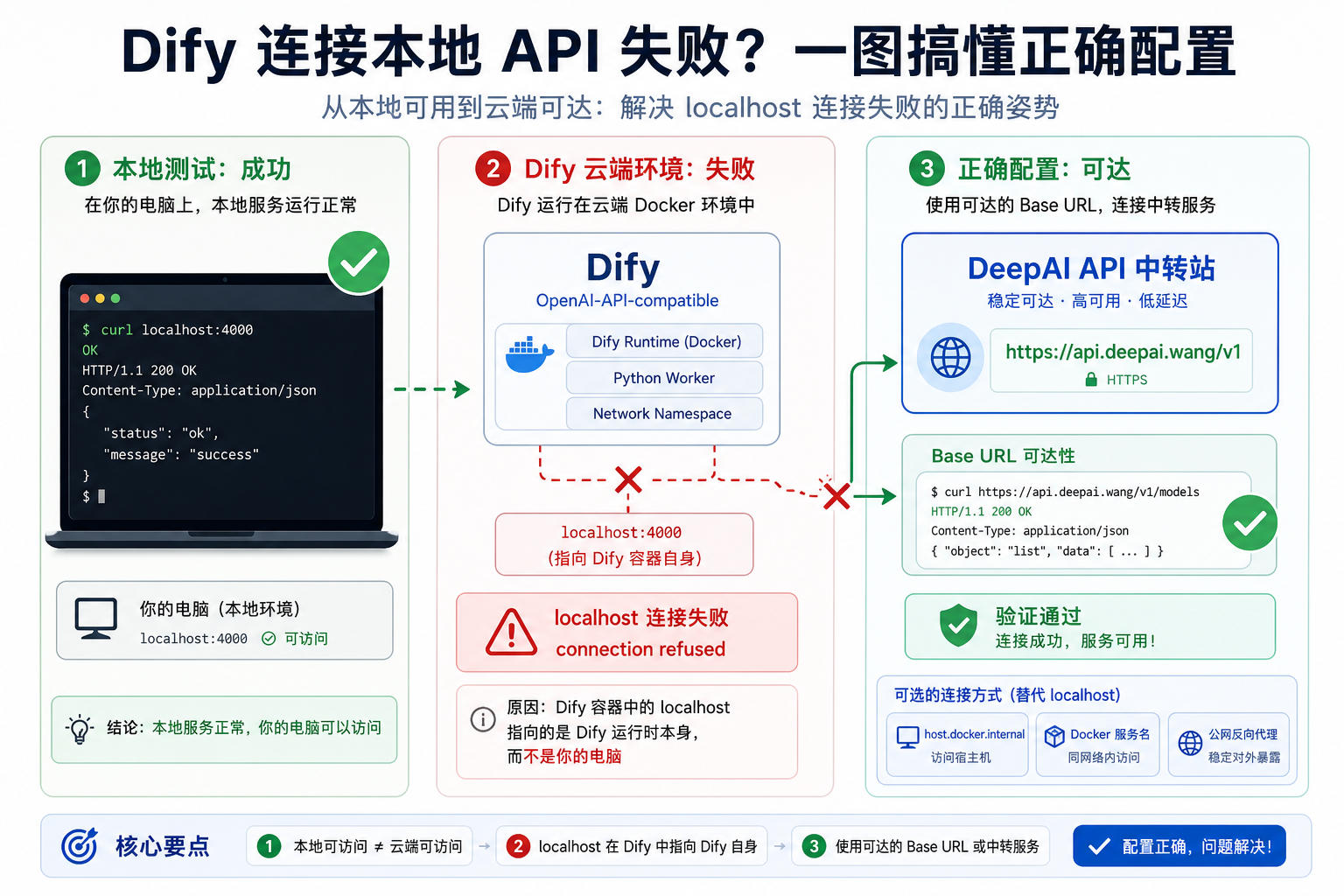
Dify deepai openai compatible localhost connection refused.png

Dify 接入 DeepAI API 中转站:OpenAI-API-compatible 的 localhost 连接失败排查Dify 接入 DeepAI API 中转站:OpenAI-API-compatible 的 localhost 连接失败排查

Dify 通过 OpenAI-API-compatible 接入 LiteLLM、DeepAI API 中转站或本地代理时,curl 本机可用但 Dify 校验报 localhost connection refused,通常是网络可达性问题。本文结合 Dify Issue #4460 整理 Cloud、Docker、自托管场景下的 Base URL 排查方法。

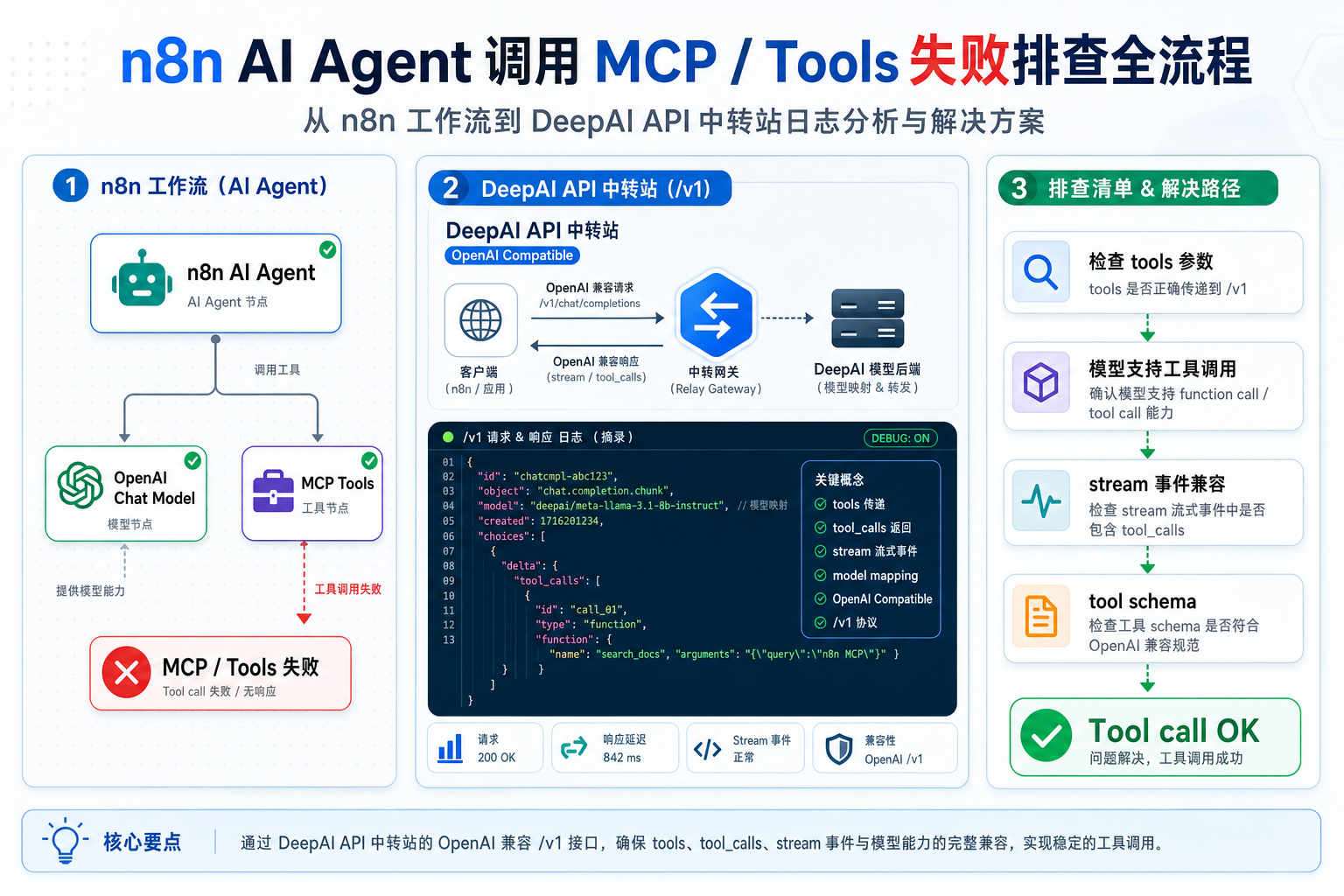
N8n ai agent deepai custom base url mcp tools fail.png

n8n AI Agent 接入 DeepAI API 中转站:自定义 Base URL 下 MCP/Tools 失败排查n8n AI Agent 接入 DeepAI API 中转站:自定义 Base URL 下 MCP/Tools 失败排查

n8n AI Agent 使用 OpenAI-compatible 自定义 Base URL 时,普通聊天能跑通,但连接 MCP Client 或 Tools 后失败,常见原因不是 Key 错,而是模型工具调用能力、tools 参数、streaming 与中转站透传不完整。本文结合 n8n Issue #15862 与官方文档整理排查路径。

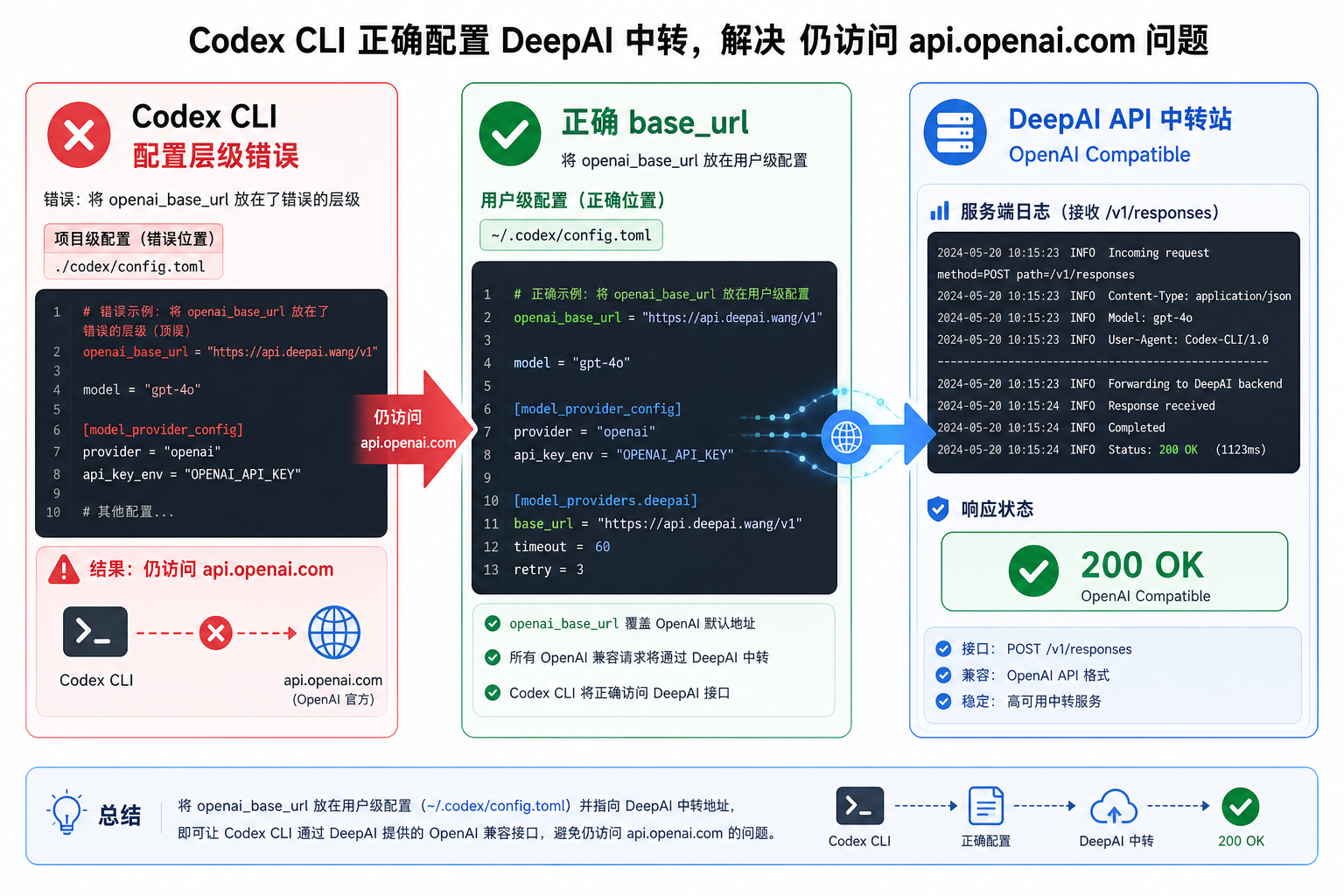
Codex cli deepai openai base url ignored config.png

Codex CLI 接入 DeepAI API 中转站:openai_base_url 不生效仍访问 api.openai.com 的排查Codex CLI 接入 DeepAI API 中转站:openai_base_url 不生效仍访问 api.openai.com 的排查

Codex CLI 配置 DeepAI API 中转站或其他 OpenAI-compatible endpoint 后,仍然请求 api.openai.com,通常不是中转站失效,而是 openai_base_url、model_provider 或 model_providers 写错了配置层级。本文结合 openai/codex Issue #16719 与官方 config.toml 文档,整理可复现排查步骤。

Codex cli deepai responses api missing reasoning item.png

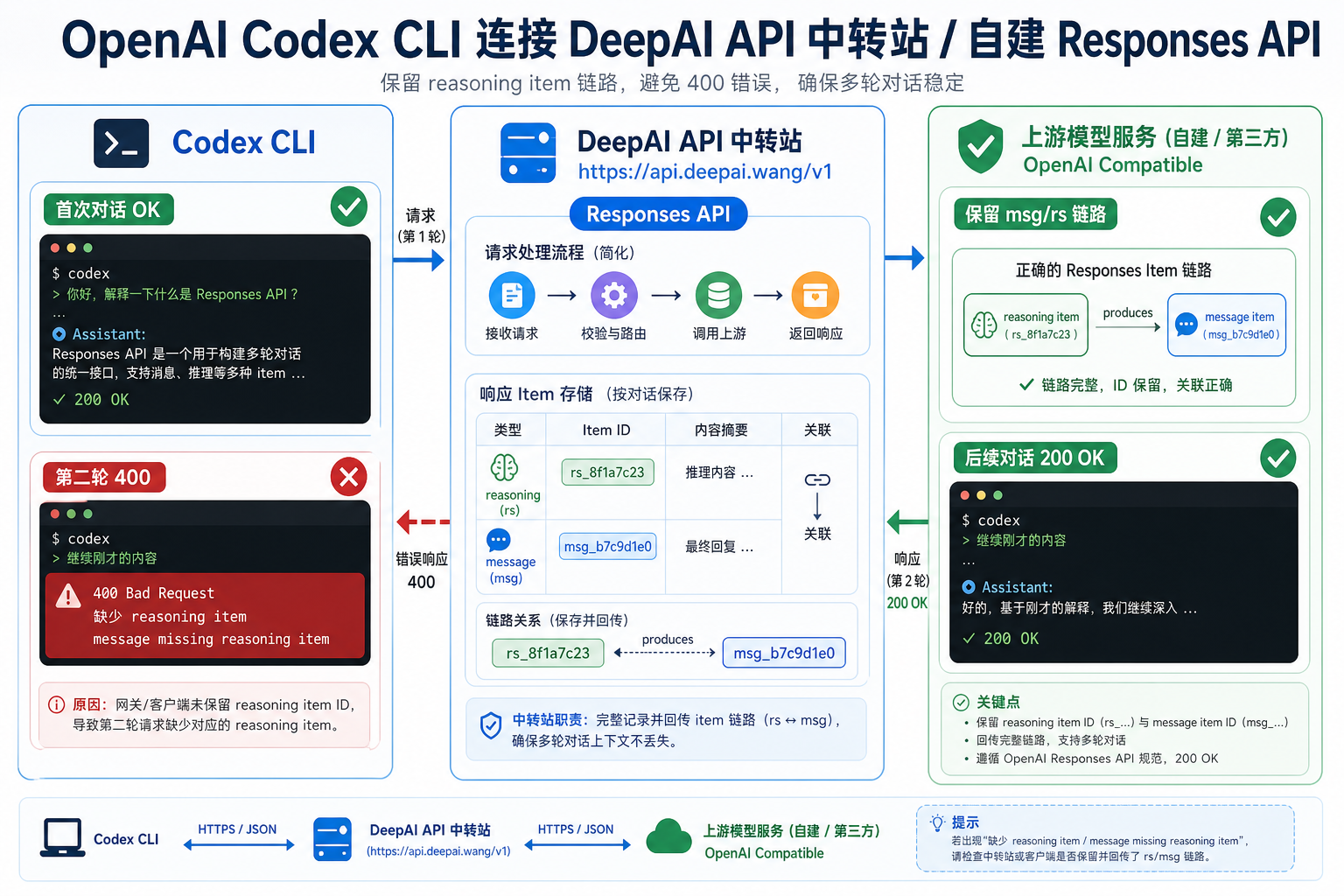
Codex CLI 接入 DeepAI API 中转站:Responses API 缺 reasoning item 导致第二轮 400Codex CLI 接入 DeepAI API 中转站:Responses API 缺 reasoning item 导致第二轮 400

Codex CLI 通过自定义 Responses API Provider 或 Azure/中转站调用 GPT-5 Codex 时,如果第一轮成功、第二轮报 message missing reasoning item,通常是 response item 与 reasoning item 没有被完整保存和回放。本文结合 openai/codex Issue #6375、#5990 与 PR #3528,整理 DeepAI API 中转站场景下的排查与修复方法。

Claude code deepai anthropic base url v1 messages.png

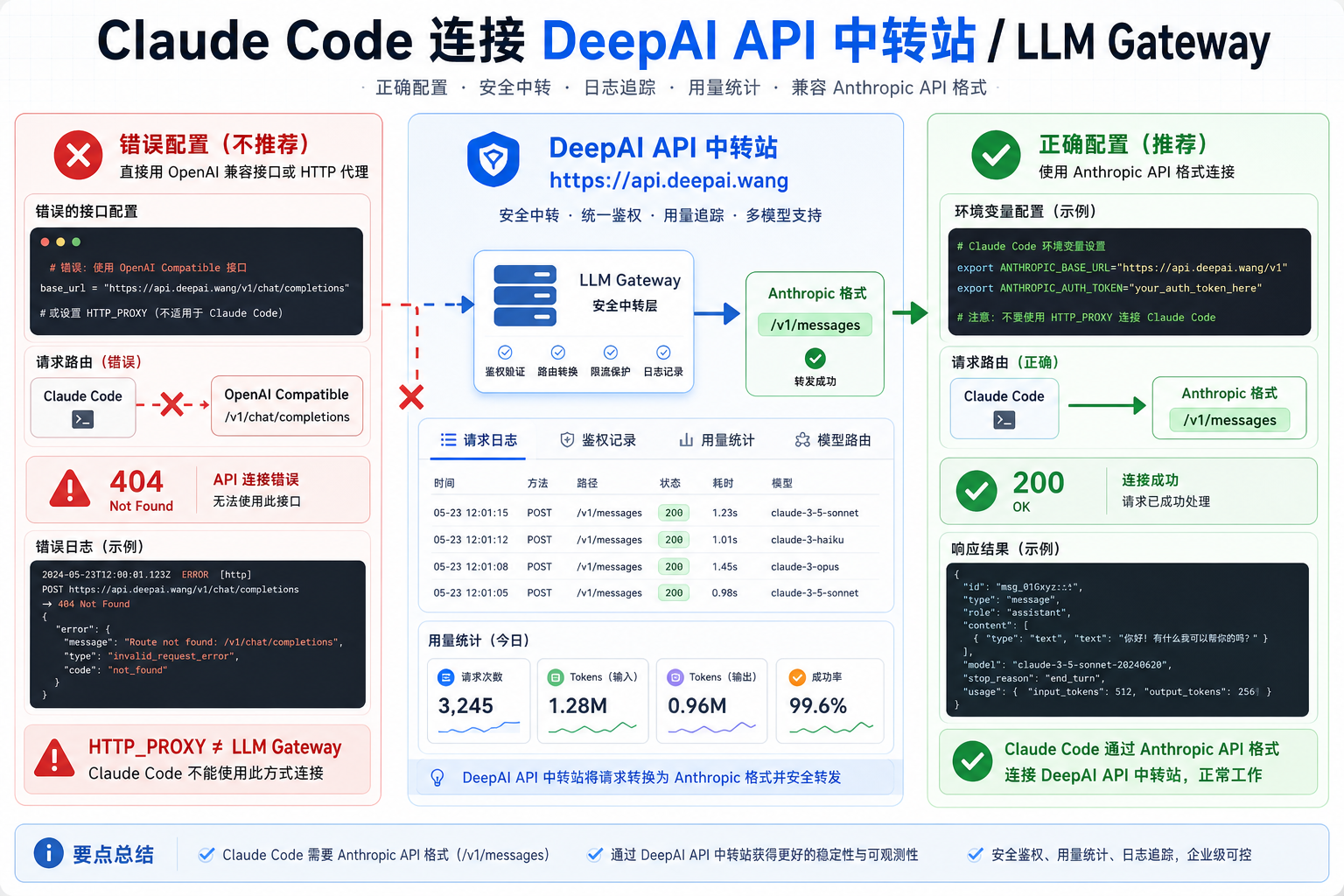
Claude Code 接入 DeepAI API 中转站:ANTHROPIC_BASE_URL 与 /v1/messages 怎么配置Claude Code 接入 DeepAI API 中转站:ANTHROPIC_BASE_URL 与 /v1/messages 怎么配置

Claude Code 支持通过 ANTHROPIC_BASE_URL 接入 LLM Gateway,但它需要 Anthropic API 格式的 /v1/messages,而不是普通 OpenAI-compatible /v1/chat/completions。本文结合 Claude Code Issue #216、官方 LLM Gateway 文档和 OAuth 覆盖问题,整理 DeepAI API 中转站场景下的接入与排查方法。

N8n deepai gpt5 unsupported stop parameter.png

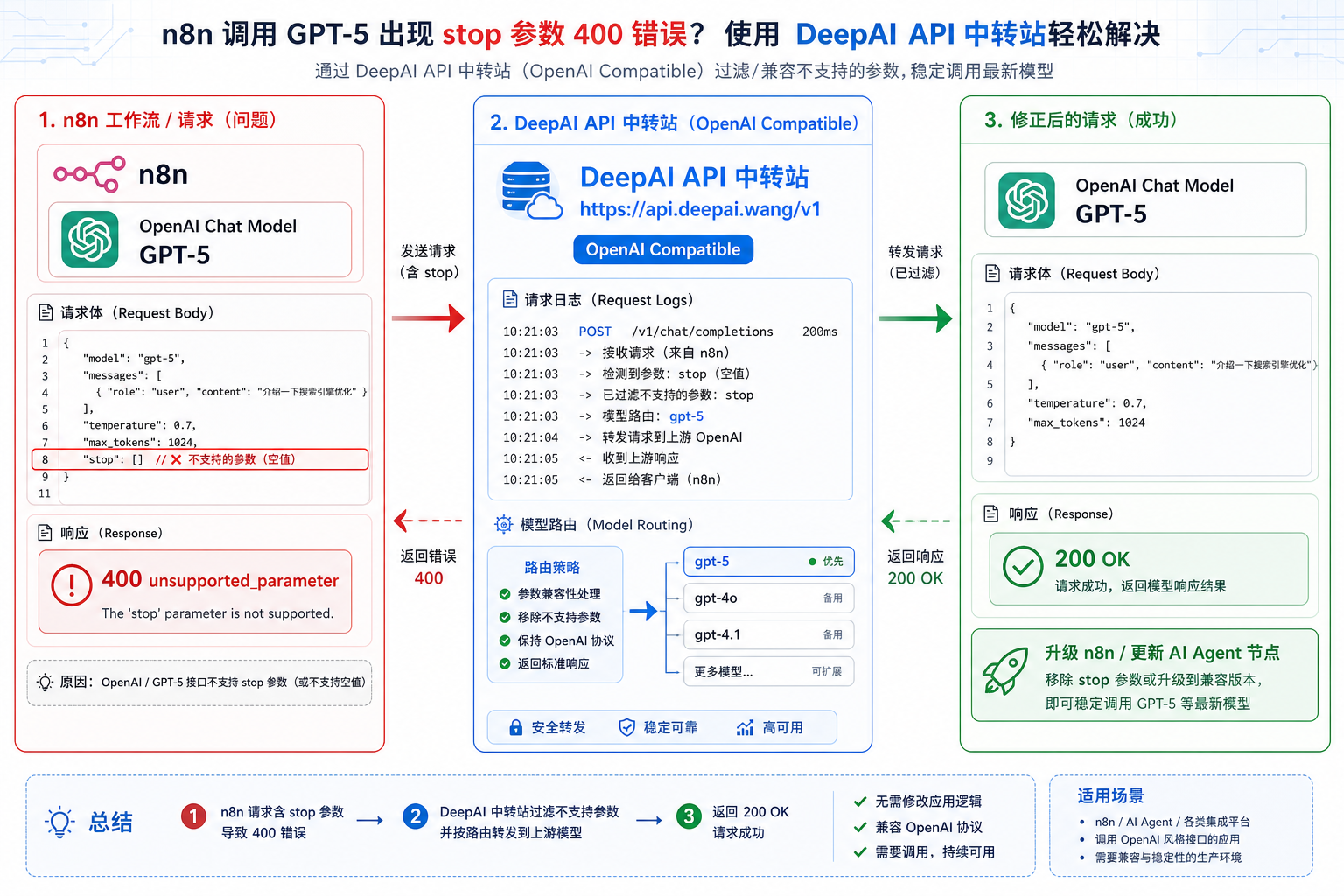
n8n 接入 DeepAI API 中转站:GPT-5 unsupported STOP parameter 怎么修n8n 接入 DeepAI API 中转站:GPT-5 unsupported STOP parameter 怎么修

n8n 的 OpenAI Chat Model 节点接入 GPT-5 或 OpenAI-compatible Provider 时,如果报 unsupported STOP parameter,即使界面里没有手动设置 stop,也要检查旧 LangChain 依赖、旧 AI Agent 模板和请求体透传。本文结合 n8n Issue #18149 和 PR #18213,整理 DeepAI API 中转站场景下的排查与修复方法。

Cherry studio deepai gpt5 reasoning effort 400.png

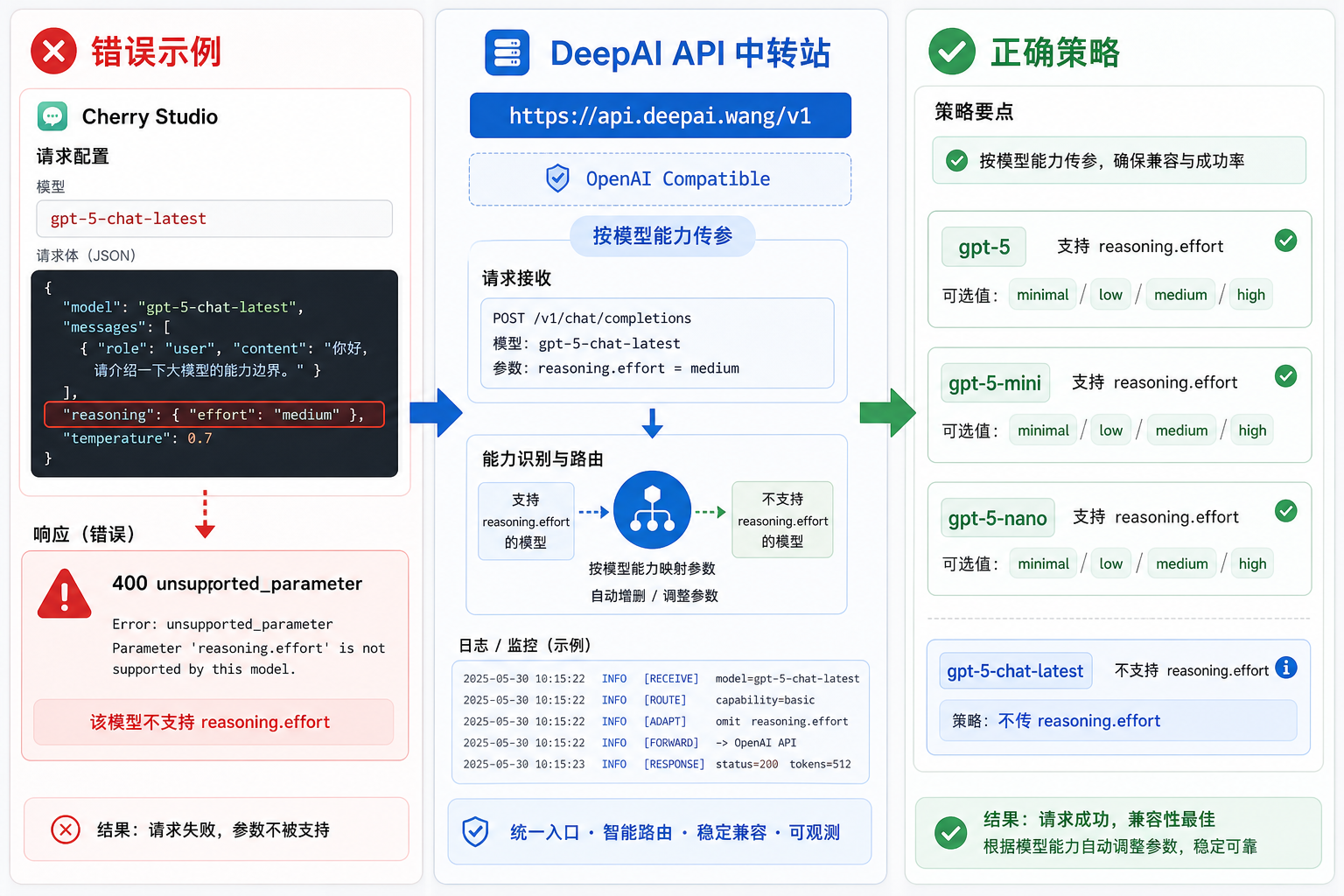
Cherry Studio 接入 DeepAI API 中转站:GPT-5 reasoning.effort 400 怎么排查Cherry Studio 接入 DeepAI API 中转站:GPT-5 reasoning.effort 400 怎么排查

Cherry Studio 通过 OpenAI-compatible Provider 接入 GPT-5 系列模型时,reasoning effort 需要按模型能力传参:gpt-5/gpt-5-mini/gpt-5-nano 支持 minimal/low/medium/high,但 gpt-5-chat-latest 可能不支持 reasoning.effort。本文结合 Cherry Studio Issue #9013 和 PR #8945,整理 DeepAI API 中转站场景下的排查与配置方法。

Dify deepai max completion tokens reasoning model.png

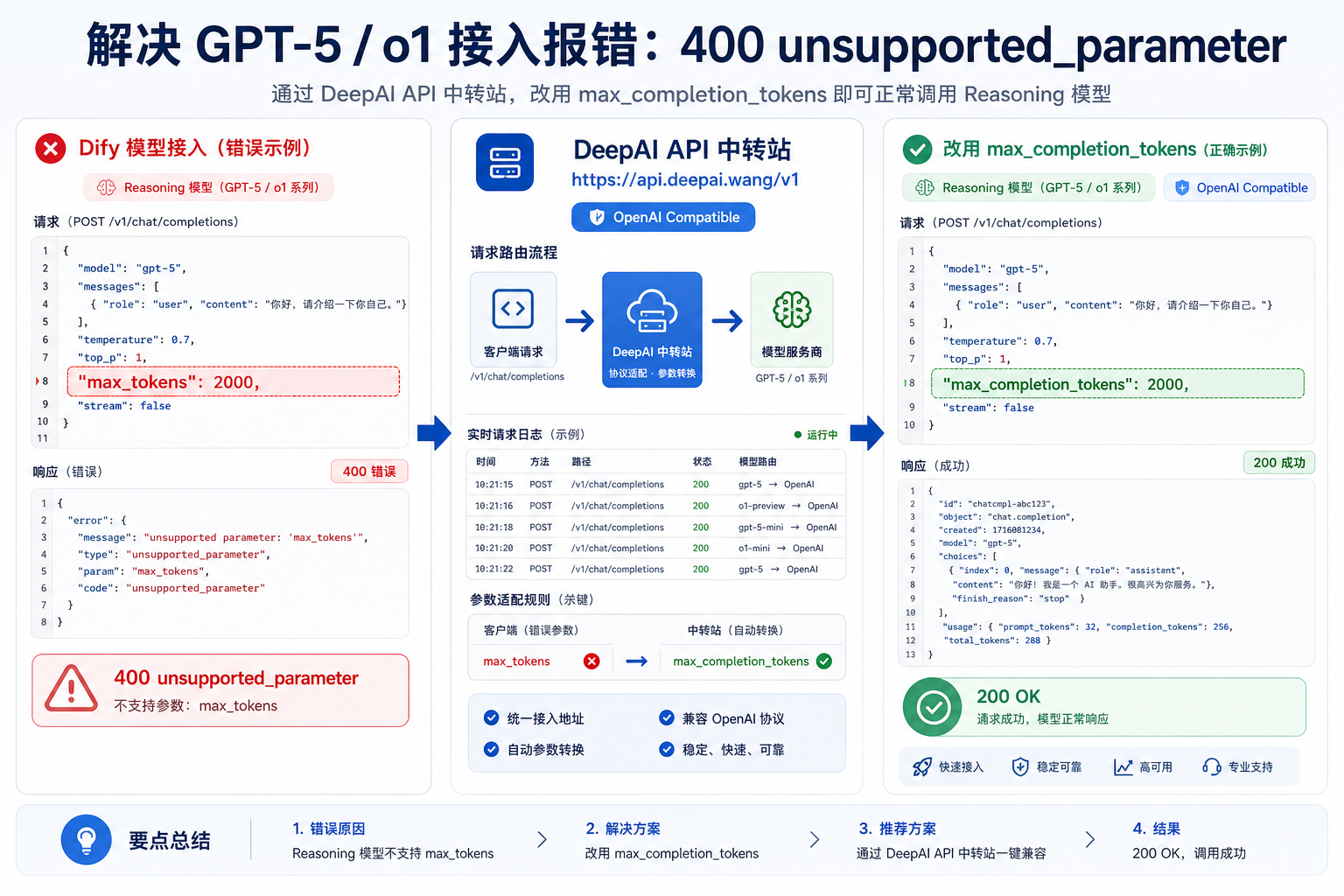
Dify 接入 DeepAI API 中转站:max_tokens 不支持改用 max_completion_tokensDify 接入 DeepAI API 中转站:max_tokens 不支持改用 max_completion_tokens

Dify 使用 OpenAI-API-compatible Provider 接入 o1、GPT-5 或其他 reasoning 模型时,如果模型校验或运行报 Unsupported parameter: max_tokens,通常要改用 max_completion_tokens。本文结合 Dify Issue #10348、官方插件 Issue #1845 和 PR #2713/#2771,整理 DeepAI API 中转站场景下的排查与修复方法。