Hermes Agent 适合做更长周期的代码任务、审批、压缩、记忆和多步骤辅助工作。对使用 DeepAI API 中转站、OpenClaw Router 或其他 OpenAI-compatible 网关的团队来说,最常见的目标是把所有模型请求统一到一个中转站入口。但 Hermes 这类 Agent 有一个容易被忽略的点:主对话模型能用,不代表所有辅助任务也走同一个 Provider。
GitHub Issue 背景:主 Provider 是 custom,但辅助任务走到错误端点
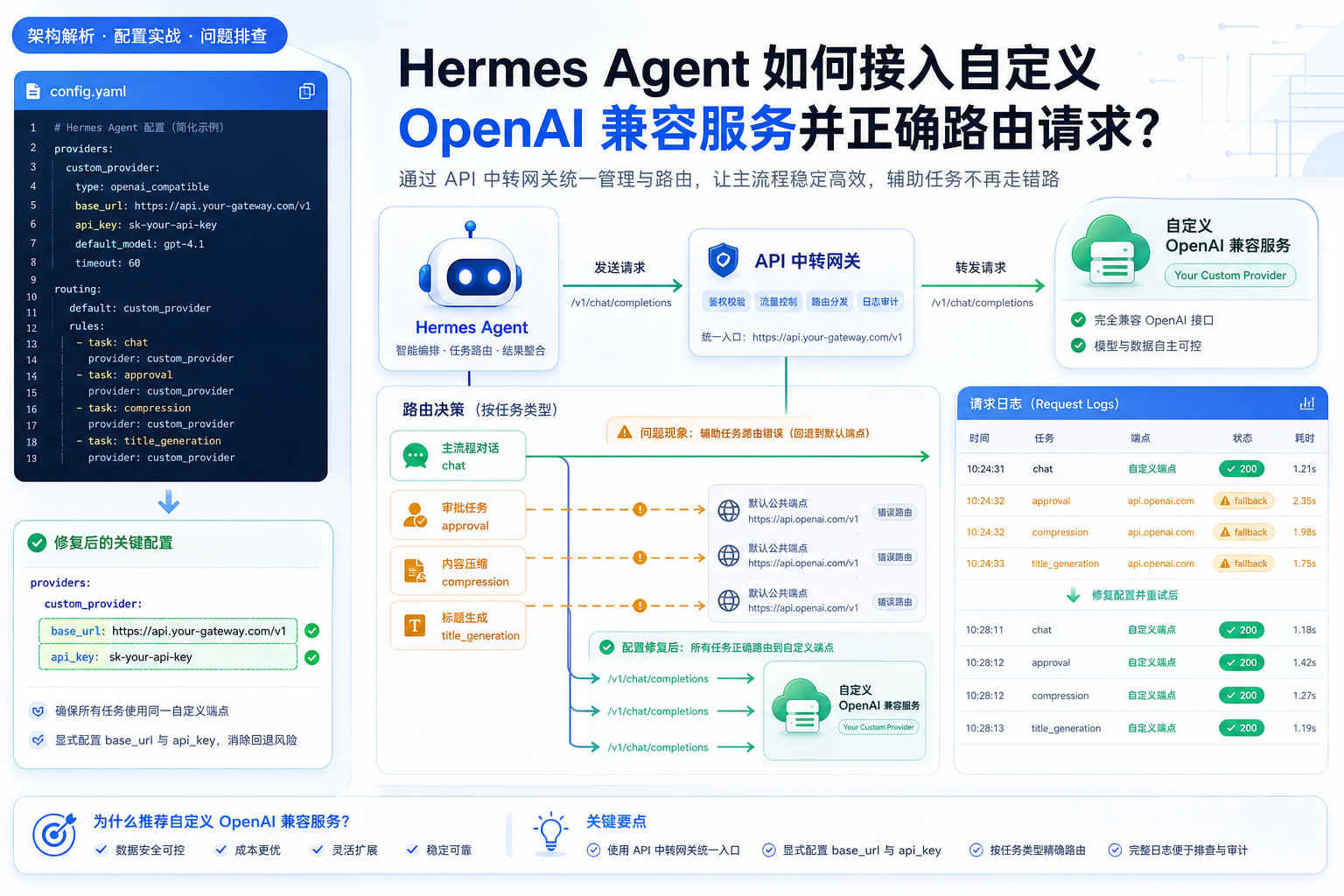
Hermes Agent 的 GitHub 仓库中有一个已关闭且标记为 completed 的 Issue:用户配置了 custom:openclaw-router 这类 OpenAI-compatible Provider,但 set_runtime_main() 没有把 base_url、api_key、api_mode 传给辅助客户端路由。结果是主模型看似配置正确,辅助任务却在 auto 模式下 fallback 到别的端点。
Issue 中提到的辅助任务包括 approval、compression、title generation 等。用户原本希望这些请求也走自己的 custom endpoint,但日志里却看到请求被路由到了其他 Provider。这个问题非常适合 API 中转站用户借鉴:Agent 系统里并不是只有“聊天请求”,还有很多后台辅助请求。
为什么主模型能用,辅助任务却会走偏
很多 Agent 框架会把任务拆成多个模型调用。主流程负责理解用户需求和执行计划,辅助流程负责审批危险命令、压缩上下文、生成标题、总结记忆或做后台判断。如果框架只把 Provider 和 model 传给辅助路由,却没有传 base_url 和 api_key,custom Provider 就可能无法被正确还原。
- 主聊天成功:说明 default provider 的模型调用能通。
- 审批走偏:可能是 auxiliary approval 使用了 auto fallback。
- 压缩走偏:context compression 可能没有继承 custom provider 的 base_url。
- 标题生成走偏:title generation 可能被路由到默认公共端点。
DeepAI API 中转站推荐配置思路
如果你希望 Hermes Agent 的所有模型请求都走 DeepAI API 中转站,核心原则是:不要只配置主模型,也要显式配置辅助任务。OpenAI-compatible Base URL 通常使用:
https://api.deepai.wang/v1
然后在 Hermes 的配置里,为 custom provider 填入模型、base_url 和 api_key。示例思路如下:
model:
  default: your-model-id
  provider: custom:deepai-router

custom_providers:
  - name: deepai-router
    base_url: https://api.deepai.wang/v1
    model: your-model-id
    api_key: your-deepai-api-key
注意不要把完整的 /chat/completions 写进 base_url,也不要在 api_key 字段里额外加 Bearer。模型 ID 要和 DeepAI API 中转站后台实际可用模型保持一致。
关键修复:辅助任务也要显式指定 Provider
在 Issue 给出的 workaround 中,最实用的做法是把辅助任务配置写清楚,避免 provider: auto 在 custom Provider 场景下走错。可以按任务类型逐项配置:
auxiliary:
  approval:
    provider: custom
    model: your-model-id
    base_url: https://api.deepai.wang/v1
    api_key: your-deepai-api-key
  compression:
    provider: custom
    model: your-model-id
    base_url: https://api.deepai.wang/v1
    api_key: your-deepai-api-key
  title_generation:
    provider: custom
    model: your-model-id
    base_url: https://api.deepai.wang/v1
    api_key: your-deepai-api-key
真实配置字段以你当前 Hermes Agent 版本为准,但思路不变:所有会调用模型的后台任务,都应该明确知道使用哪个 Provider、哪个模型、哪个 base_url 和哪个 key。
排查日志时重点看什么
Hermes Agent 这类工具的日志非常关键。你需要看的不只是“请求成功或失败”,而是每类任务实际使用了哪个 Provider 和 Endpoint。建议重点检查:
- approval 请求是否走 DeepAI API 中转站。
- compression 请求是否仍然使用 custom provider。
- title generation 是否被路由到默认公共端点。
- DeepAI 后台日志中是否能看到对应请求。
- 错误码是 401、404、429,还是工具/参数格式错误。
如果 Hermes 日志显示请求去了其他 endpoint,而 DeepAI API 中转站后台完全没有记录,就说明问题在 Agent 的路由配置,还没到中转站。如果后台有记录但上游失败,再继续看模型权限、模型 ID、上下文长度和请求参数。
为什么这对成本和安全很重要
辅助任务走错端点不只是“偶尔报错”这么简单。它可能带来三个问题:成本不可控、日志不可追踪、敏感上下文被发到非预期 Provider。对于企业或团队使用 Hermes Agent 的场景,把所有请求统一到 DeepAI API 中转站,可以更好地做额度控制、日志审计、模型权限和异常追踪。
建议为 Hermes Agent 单独创建一个 DeepAI API Key,并按任务拆分日志标签。这样当 approval、compression 或 title_generation 产生异常消耗时,你可以在后台快速定位是哪一类辅助请求导致的。
常见错误与处理方式
- 主模型正常但审批失败:检查 auxiliary approval 是否显式配置 custom provider。
- 日志显示 fallback:说明 auto route 没拿到 base_url 或 api_key,应改为显式配置。
- 401:检查 DeepAI API Key 是否填错,是否多加 Bearer,是否有模型权限。
- 404:检查 base_url 是否到
/v1,模型 ID 是否存在。 - 429:检查 Agent 是否在压缩、审批、重试中产生过多并发请求。
参考资料
- Hermes Agent GitHub 仓库
- Hermes Agent Issue #34777:custom provider base_url/api_key 未传递导致辅助任务 fallback
- DeepAI API 中转站教程导航
- Hermes Agent 教程合集
总结
Hermes Agent 接入 DeepAI API 中转站时,不要只验证主模型是否能聊天。approval、compression、title generation 这些辅助任务同样会调用模型,也同样需要正确的 Provider、base_url、api_key 和模型 ID。遇到 custom Provider 辅助任务走错端点时,优先把 auxiliary 配置显式写清楚,再通过 Hermes 日志和 DeepAI 后台日志双向确认。这样才能真正做到所有 Agent 请求都走统一中转站,既稳定,也方便审计和控费。